15 Useful Twitter Hacks and Plug-Ins For WordPress

Since its launch in 2006, Twitter has grown to create what most people would call a social media revolution. By the very nature of the short messages it hosts, Twitter is a wonderful marketing and promotion tool that no serious blogger can ignore.
In this article, we have compiled 15 most useful Twitter plug-ins, hacks and tips for WordPress to help you get the most out of Twitter in your WordPress blog.
You may want to take a look at the following related posts:
- 50 Twitter Tools and Tutorials For Designers and Developers
- 8 Useful Tips To Become Successful With Twitter
1. WordPress Hacks For Twitter
WordPress plug-ins are good, but if you have 50 different plug-ins active on your blog, you should obviously expect longer loading times and even some inconvenience. This is why we love hacks! First let’s dive deep into WordPress and see what hacks can do to enhance our blogging experience. In the second part of this article, we will also show you some useful Twitter plug-ins for your WordPress blog.
Automatically create TinyUrls for your blog posts

Because of the restriction on character numbers in Twitter, you have to use a URL shortener when tweeting URLs. So, to help your readers tweet about your posts, you should definitely provide short URLs for all of your posts.
Here’s how to automate that task:
Open your functions.php file and paste the following code:
function getTinyUrl($url) {
$tinyurl = file_get_contents("http://tinyurl.com/api-create.php?url=".$url);
return $tinyurl;
}
Once done, paste this in your single.php file, within the loop:
<?php $turl = getTinyUrl(get_permalink($post->ID)); echo 'Tiny Url for this post: <a href="'.$turl.'">'.$turl.'</a>' ?>
To see this in action, visit my website, WpVote, and look at any post.
Source: How to: Automatically provide TinyUrls for your WordPress blog posts
Display your latest tweet without a plug-in

If people like your blog, they would probably also enjoy your tweets. Displaying your latest tweets on your WordPress blog is a good way to gain new subscribers. A plug-in can do that, but for such a simple task, I prefer a hack. This one grabs your latest tweet and displays it on your blog.
This ready-to-use code can be pasted anywhere in your theme files. Just don’t forget to change the value of the $username on line 4. The $prefix and $suffix variable can be used to insert a title, and the div element can be used for further CSS styling.
<?php
// Your twitter username.
$username = "TwitterUsername";
// Prefix - some text you want displayed before your latest tweet.
// (HTML is OK, but be sure to escape quotes with backslashes: for example href=\"link.html\")
$prefix = "<h2>My last Tweet</h2>";
// Suffix - some text you want display after your latest tweet. (Same rules as the prefix.)
$suffix = "";
$feed = "http://search.twitter.com/search.atom?q=from:" . $username . "&rpp=1";
function parse_feed($feed) {
$stepOne = explode("<content type=\"html\">", $feed);
$stepTwo = explode("</content>", $stepOne[1]);
$tweet = $stepTwo[0];
$tweet = str_replace("<", "<", $tweet);
$tweet = str_replace(">", ">", $tweet);
return $tweet;
}
$twitterFeed = file_get_contents($feed);
echo stripslashes($prefix) . parse_feed($twitterFeed) . stripslashes($suffix);
?>
Save the file, and your latest tweet is displayed on your blog. Nice, huh?
Sources:
Display your latest tweet as an image
Because of Twitter’s success, a lot of third-parties have started promoting additional Twitter services. TwitSig is one of them. This website is very ugly but also very cool because it allows you to get an auto-updating image that displays your latest Twitter entry.
While using this image as a signature in forums would be good enough, integrating it in your WordPress blog, under your posts for example, would also be great.
- Go to Twitsig.com. You don’t have to register: very nice!
- Simply enter your Twitter username in the text field.
- And your Twitter image is ready, displaying your latest tweet. The image is automatically updated when you update your Twitter status.
- Open any of your WordPress theme files and paste the following code (make sure to replace my username with yours!):
<a href="http://twitter.com/catswhocode"><img src="http://twitsig.com/catswhocode.jpg"></a>
Create a “Tweet this” button

Twitter is definitely a great way to gain exposure on the Web. This is why I created a fancy “Send to Twitter” button and implemented it on my blogs (see links at the bottom of the article). Go here if you’d like to see this hack in action.
- Open the single.php file in your theme.
- Paste the following code where you’d like your Twitter button to appear:
<a href="http://twitter.com/home?status=Currently reading <?php the_permalink(); ?>" title="Click to send this page to Twitter!" target="_blank"><img src="send-to-twitter.png" alt="" /></a>
Some time ago, in my “Mastering WordPress shortcodes” article here on Smashing Magazine, I showed you how to create a “Send to Twitter” WordPress shortcode. I also wrote an article on Pro Blog Design about creating a “Send to Twitter” WordPress widget. You can read that tutorial here!
Detect a visitor from Twitter

Visitors coming to my blogs from Twitter now represent something like 10% of all my traffic, which is quite a lot. Because many Twitter users re-tweet blog posts that they like, it may be a very good idea to detect Twitter visitors, welcome them and, of course, remind them that their re-tweets are appreciated.
To do this, open your single.php file and paste these lines where you’d like your “Welcome Twitter user” message to be displayed.
<?php
if (strpos("twitter.com",$_SERVER[HTTP_REFERER])==0) {
echo "Welcome, Twitter visitor! If you enjoy this post, don't hesitate to retweet!";
}
?>
This code will detect readers coming from Twitter and display the message only to them.
Create a Twitter page on your WordPress blog
We already showed you how to display your latest tweet on your blog, in your sidebar for example. Another good way to introduce readers to your Twitter updates is to create a dedicated page for displaying your tweets, using the powerful “Page template” WordPress option.
To perform this hack, you need to know how to create and use page templates. If you’re not familiar with this, this article will tell you all you need to know.
Here’s the code to create a Twitter page template. Paste it in a new file, name the file something like twitter-page.php, for example, and then add it to your blog.
<?php
/*
Template Name: Twitter page
*/
get_header();
include_once(ABSPATH.WPINC.'/rss.php');
wp_rss('http://twitter.com/statuses/user_timeline/15985955.rss', 20);
get_sidebar();
get_footer();
?>
This code uses the wp_rss() function from WordPress core, which is an RSS reader. In the first argument I pass my Twitter RSS feed, and in the second argument I determine the number of entries to display.
Using Twitter avatars in comments without plug-ins

I was pretty interested in the Twittar plug-in when it was first released and decided to look at the source to see how it works. Being a die-hard WordPress hack fanatic, I decided to create a hack using the Twittar code.
Follow these simple instructions to use Twitter avatars in your blog comments without a plug-in:
- The first thing is to get the functions file here.
- Once you have it, unzip the archive and open the twittar.php file. Select all of its contents and paste it in the functions.php file in your theme.
- Now, open your comments.php file and find the comments loop. Then, just paste the following line where you’d like the Twitter avatars to be displayed:
<?php twittar('45', 'default.png', '#e9e9e9', 'twitavatars', 1, 'G'); ?>
Source: How to: Use Twitter avatars in comments
2. WordPress Plug-Ins For Twitter
Twitter Updater
Are you using Twitter to notify readers about your new blog posts, or even old ones that you’ve updated? If so, then Twitter Updated is definitely something to consider. The plug-in automatically sends an update status request to Twitter when you create or modify a post. Text is customizable, and the plug-in provides many options.
Twit this
The Twit This plug-in makes it easy for readers to tweet about your blog posts by creating a “Share on Twitter” link on your blog. When someone clicks on it, your blog post’s URL is automatically sent to Twitter, and the visitor can enters a description before sending the tweet to his or her friends.

Twit it up
Twit it up is a simple AJAX-powered WordPress plug-in that basically does the same thing as Twit this: allows readers to tweet one of your posts directly from your blog by clicking a simple link.

Twit-Twoo
Twit-Twoo is a very useful for bloggers because it allows you to tweet friends directly from your WordPress dashboard. Particularly great if you spend a lot of time on your WordPress dashboard!

Twitter Tools
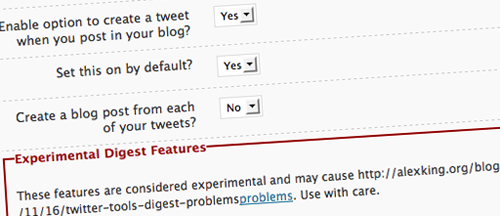
Twitter Tools, created by Alex King, is one of the most popular Twitter plug-ins for WordPress. It completely integrates Twitter in your WordPress blog, allowing you to archive your tweets, create a blog post from each of your tweets and post tweets from your admin dashboard or sidebar. It also allows you to create a daily digest of tweets; very nice if you tweet a lot!
Twittar
Twittar was released here on Smashing Magazine back in January. Remember it? This plug-in integrates Twitter avatars in the comment template of your WordPress blog. Definitely a plug-in to consider if you and your readership often use Twitter! And don’t worry if any of your readers don’t use Twitter (yet), Twittar automatically displays gravatars if no Twitter avatar is available.

Tweetbacks
Since its release only one month ago, the Tweetbacks plug-in has created a mini-revolution in the blogging world. While your WordPress blog can automatically notify you when bloggers discuss your posts on their own blogs, via Trackbacks, it can’t notify you when people discuss your posts on Twitter. That’s why Tweetbacks is so great: it automatically imports tweets about your posts and lets you display them either as comments or separately.

Related Posts
You may want to take a look at the following related posts:
- 50 Twitter Tools and Tutorials For Designers and Developers
- 8 Useful Tips To Become Successful With Twitter
(al)


James Cowie
March 4th, 2009 8:07 amVery nice post, thanks alot,
Evan
March 4th, 2009 8:08 amvery useful discussion, thanks for the walkthrough XD
Genero
March 4th, 2009 8:08 amExcellent article, I have just integrated twitter into my blog but will go back and check these out.
Jeff
March 4th, 2009 8:17 amGreat post. Very helpful as I am new to the twitter world and still figuring everything out. I really like the tweetbacks plugin.
But, boy some of those logos are horrific!
Enk.
March 4th, 2009 8:39 amAhah Cool !.
Thinking to implement one on my blog.. :P
DKumar M.
March 4th, 2009 8:39 amNice Article Jean….!!
Idealien
March 4th, 2009 8:50 amNice article – Some useful code snippets for future use. Thx.
TwitMe is another option for integrating Twitter directly into the dashboard.
akira
March 4th, 2009 8:54 amExactly what I was looking for!!! tweeting this! :)
Chung Bey Luen
March 4th, 2009 8:56 amNice list. This is what I’m looking for.
Daniel
March 4th, 2009 9:03 amYou missed http://tweetmeme.com/button.php which basically works like digg, but for twitter.
Jens
March 4th, 2009 9:13 amTweeting rules! Nice list.
Zackatoustra
March 4th, 2009 9:14 amGreat list!
I had’nt thought of most of the functionnalities presented here! The web is full of wonderful people!
Sinoun
March 4th, 2009 9:14 amWas never a huge fan of Twitter… but I think this article has changed my mind. Thanks!
Sinoun
Ken the tech
March 4th, 2009 9:26 amLong but interesting article. I’m not a Twitter fan but never know ;)
Peter Vatistas
March 4th, 2009 9:27 amThanks a million for the Twitter tips! I’ve tried a few Twitter plugs and ended up creating a separate page and dropping Twitter’s code into it. The tips you provided will allow me to do exactly what I want without having to send users to a secondary page, THANK YOU!!!
Peter Vatistas
HeriNXI
March 4th, 2009 9:29 ami think you must correct that text and its link,
thank for the info :)
HeriNXI
March 4th, 2009 9:30 amsorry, i mean this line :)
Go to Twisig.com. You don’t have to register: very nice!
Keith
March 4th, 2009 9:38 amI use TwitIMG.com for my forum images, just put in your twitter name, up pops an image.
Maigret
March 4th, 2009 9:42 amHey Jbj you’re in great shape right now ! Thanks a lot for your Twitter hacks, I’ll try to do these on my blog ! ;)
Mezanul
March 4th, 2009 9:43 amThanks, going to implement some at my blog!
Christophe
March 4th, 2009 9:55 amVery cool list!!
John Turner
March 4th, 2009 10:35 amCool, I’ll have to incorporate some of these in my open source Twitter Inspired WordPress theme:
Twordder
Jesse
March 4th, 2009 11:22 amI tried implementing the “Display your latest tweet without a plug-in”, but I keep getting errors. I pasted it on the sidebar.php file if that helps.
Thanks!
Wade Jackman
March 4th, 2009 11:27 amThanks for the great post! Twitter is just taking over now.
Jen
March 4th, 2009 12:23 pmCool. I also appreciated the link to WPRecipes and the page creation tutorial.
crossmage
March 4th, 2009 2:06 pmGood stuff here – i will have to play with some of those hacks.
i have also been using Twitter tools for well over a year now. It does a lot of great things, though I had to stop the daily digests as it was creating some empty blogging for me when I would tweet regularly but post only once in a while.
OTOH, it has been interesting to go back and read those same Twitter digest entries from last year.
Good stuff!
James
Kendall
March 4th, 2009 2:11 pmIncredible the amount of PR Twitter’s been getting lately. First, Capitol Hill, then the Daily Show, now Smashing Mag. I am extremely excited to see what the world can do with Twitter technology!
Jean-Baptiste Jung
March 4th, 2009 2:22 pmThanks to everyone for the great comments, glad you enjoyed the post!
Don’t forget to digg it if you like.
Therese Hansen
March 4th, 2009 2:57 pmThere is much communication to gain by integrating twitter with traditional blogs!!
I’m working on another twitterplugin for wordpress right now – similar to tweetbacks but with a twist :-). I have already made a twitter-plugin for wordpress (CommentTweets) for sending notifications (@replies) to your twitter-account when somebody has continued the conversation on a blog post you have commented on; http://wordpress.org/extend/plugins/commenttweets
The Virtual Consulting Firm
March 4th, 2009 3:21 pmGreat Article, Tips and Tools, Jean-Baptiste! :)
Thank you for compiling and sharing all of this information with all of us! :)
Nik
March 4th, 2009 4:12 pmTwitter, the tool for bird brained twits that just *have* to share their vacuity with everyone.
Jon Bergan
March 4th, 2009 5:35 pmWow! Thanks for showcasing Twit It Up in your list of Twitter Plugins. Hope you guys like it! Great roundup of hacks/plugins also. Keep up the fantastic work!
Rgds,
Jon
Corrado Coia
March 4th, 2009 7:02 pmYour timing is perfect. I just started looking into how to get these exact Twitter things accomplished this morning.
Thanks for the great post and great information.
Cheers,
@CorradoCoia
gr8pixel
March 4th, 2009 8:16 pmvery impressive! great post… Thanks! :D
Shahryar
March 4th, 2009 9:29 pmawesome, will be trying this out
bill
March 4th, 2009 11:33 pmvery useful for me, I will use some of the function in my blog.
thanks
tony
March 5th, 2009 12:13 amWhat’s a twitter? o.O
requirezero
March 5th, 2009 5:36 amtwitter for kids
Denis
March 5th, 2009 6:44 amTry Thread Twitter!
Trendy Pixels
March 5th, 2009 7:38 pmWow thanks for these! I love good twitter icons.
Shantanu Goel
March 5th, 2009 11:03 pmThose are cool hacks. But you do not need to modify your wordpress/theme files to incorporate them or install a bucket full of plugins. You just need one plugin that can add all these hacks (and whatever else you want) automatically to your posts WordPress Prefix Suffix
robin @ elements, inc.
March 6th, 2009 9:38 amthanks a bunch for these cool plug ins!
Chris Robinson
March 6th, 2009 10:36 amdig the “Display your latest tweet without a plug-in” thanks!
Rogério Oliveira
March 6th, 2009 10:45 amfodastico
Adi
March 6th, 2009 2:37 pmwow, great!
change name to “twitter magazine”
: /
Verne
March 8th, 2009 1:45 amThis is friggin’ awesome. Thanks SM!
pritika
March 8th, 2009 9:50 pmhey, nice content
Nico
March 9th, 2009 5:47 amNice, thank you!
Maria Keckler
March 12th, 2009 3:10 pmA question… are these tips available for WordPress.com hosted blogs also? I haven’t yet gotten into customizing CSS, are these some of the things I can do once I dare dive in? ;)
hector
March 13th, 2009 7:51 amQuestion: how can I insert one of this Twitter icons in the sidebar of my blog? http://www.inspiredm.com/2009/03/02/twitter-art-the-most-inspirational-twitter-graphics/
Jeremy
March 13th, 2009 7:57 pmwow thanks for the list!
http://www.bathrobewarrior.com
jph
March 14th, 2009 12:33 amwhy show only 51 of 78 comments? I left a fix for one of your hacks in an earlier comment,but nobody gets it?
Justin Gehring
March 14th, 2009 2:03 pmPretty nice list. There’s one more tool I would recommend to people who are looking to promote their wordpress blog using twitter that just came out called twitcapt. Pretty nifty way of creating viral twitter messges…
http://www.twitcapt.com/
Mike
March 18th, 2009 6:42 amis there by any chance a possiblity for u guys to show me the how to implement my latest tweet without the file_get_contents function? My hosting provider wouldn’t allow this one! =/
I would really apprichiate it! :)
Thx alot!
Donna Payne
March 18th, 2009 9:34 amI just love smashingmag. Y’all have the best resources – good quality stuff.
Salem
March 30th, 2009 12:33 pmI love this, and it has been really helpful. There are two things I was wondering, however… Is it possible to
1. Make the “Tweet this!” image load a page with a tinyurl, rather than the full length of the blog post? I messed around a little bit and, knowing absolutely no php, didn’t get very far.
2. make the “Tweet this!” image load only when someone comes from twitter? This way, instead of having text, I could just have that image? I tried just pasting the html code in the midst of the php, which apparently is NOT how it works.
Could someone email me with replys at salem (AT) technoheads.org? I’d really appreciate it, and I’m not sure if the author of this post responds to comments.
Anne Lindsay
April 1st, 2009 2:27 pmtHANKS ONCE AGAIN.
Jaime
April 2nd, 2009 12:57 pmthis is great! i already added the “latest tweet” hack and, after some tweaking with it, it is working great. One quick question:
Does anyone know how to increase the font size of the tweet itself? I’ve been able to do this for the prefix and suffix, but I am having trouble finding where to add font customization for the tweet itself. Any help is greatly appreciated.
Dean
April 9th, 2009 8:25 amGreat Stuff, simply great.
DJ
April 13th, 2009 8:28 amThe Twitter Page using the RSS feed doesn’t work. It ask my readers for a username/password. A way around this?
Dhane Diesil
May 3rd, 2009 8:30 amWhat an awesome list of Twitter resources. I recently wrote an article on using the Twitter for WordPress plugin from Ricks Hideout. Its a pretty cool plugin with a lot a flexibility. You can check out the tutorial here: http://desndev.com/how-to-add-twitter-to-your-wordpress-blog-sidebar-in-3-easy-steps/
antonin
May 15th, 2009 12:16 pmreally nice article. many thanks for sharing the good stuff!
cheers!
Steve Patterson
May 24th, 2009 8:02 pmThanks for sharing! @friendlyknoxguy
BK4D
May 25th, 2009 12:21 amGreat post. Thanks. I’ve implemented a number of them in my blog.
I did find a couple of problems with the ‘Detect a visitor from Twitter’ hack which didn’t work. In your sample code the parameters in the PHP strpos function are the wrong way round. First parameter should be the haystack (the string you’re searching through), and the second should be the needle (the string you’re looking for). The correct syntax is…
strpos($_SERVER[HTTP_REFERER], "twitter.com")
However, even after that fix it still wasn’t working because the correct position of “twitter.com” in the $_SERVER[HTTP_REFERER] string is 7 because it has “http://” before it. In the end, to be sure, I checked for both 0 and 7.
The code that works for me is below. Hopefully it helps anyone else that’s having trouble.
$ref = $_SERVER[HTTP_REFERER];
$pos = strpos($ref, "twitter.com");
if ($pos == 0 || $pos == 7) {
echo "Welcome, Twitter visitor! If you enjoy this post, don't hesitate to retweet!";
}
SOCFX Web Design Blog
February 24th, 2010 11:10 amThank you so much! it appears many blogs post code without even trying it lol,
Louis
BK4D
May 25th, 2009 8:29 pmHi again,
Just following on from my previous comment above, the “Welcome, Twitter visitor..” message was still appearing regardless of whether I came via Twitter or not. After changing the if statement to just…
if ($pos == 7) {
it was working correctly.
James Holmes
June 10th, 2009 8:17 amJean -
Excellent nuggets to maximize Word Press. Thank you for all of you excellent tips and post!
James
free business advertising
June 14th, 2009 6:53 pmgood plugin, i use this plugin now :)) tweet at own blog
Jude
July 12th, 2009 7:35 pmThanks for the latest tweet without a plugin code. Exactly what I was looking for.
the_guv
July 27th, 2009 4:41 pmvery nice, thank you Mr Jung.
HERO
July 31st, 2009 3:40 amBrilliant article! So informative. Thanks so much for all the great hacks, the latest tweet code is a priceless addition to my code arsenal!
Nick Heer
July 31st, 2009 7:54 pmI tried using that Twitter PHP code, but it doesn’t do so well with links and symbols. I created this version which does much better:
<?php
// Your twitter username.
$username = "YOUR.USERNAME";
// Prefix - some text you want displayed before your latest tweet.
// (HTML is OK, but be sure to escape quotes with backslashes: for example href="link.html")
$prefix = "Latest Tweet";
// Suffix - some text you want display after your latest tweet. (Same rules as the prefix.)
$suffix = " ";
$feed = "http://search.twitter.com/search.atom?q=from:" . $username . "&rpp=1";
function parse_feed($feed) {
$stepOne = explode("", $feed);
$stepTwo = explode("", $stepOne[1]);
$tweet = $stepTwo[0];
$tweet = str_replace("<", "", ">", $tweet);
$tweet = str_replace(""", """, $tweet);
$tweet = str_replace("&", "&", $tweet);
$tweet = str_replace("<a href", "", "">", $tweet);
$tweet = str_replace("", "", $tweet);
return $tweet;
}
$twitterFeed = file_get_contents($feed);
echo stripslashes($prefix) . parse_feed($twitterFeed) . stripslashes($suffix);
?>
And for some reason the code isn’t showing 100% perfectly here, either. http://idzr.org/hjggi6 is where a more readable copy of the code is.
Jignesh Adhyaru
June 30th, 2010 9:04 pmCan anyone tell me how i can show more then one tweet with this code? I tried around but no success,
any help is greatly appreciated.
Regards
Pukey
January 4th, 2011 4:27 amParsing of links is done best this way:
$tweet = html_entity_decode($tweet);
Tanveer
August 8th, 2009 3:35 amNice list.
adrian
August 19th, 2009 5:02 amExcellant article,also Ireally like your social buttons and comment system,not happy with the ones I am using,are they available for any body to use?
Trinity511
August 22nd, 2009 10:31 pmFor the twitter-page.php: error report parsing error on line three. You wrote:
1.
Thomas McGregor
September 28th, 2009 5:55 amHey,
I have actually just created a WordPress plugin that does exactly what Twittar does, but circumvents the problems since Twitter changed their stance on allowing to search by email address.
You can find it here http://wordpress.org/extend/plugins/twitter-avatar
Let me know what you think, cheers,
Thomas
Watch 2012 Online
October 8th, 2009 2:24 pmyou guys always post the greatest stuff. thanks for the help.
derp
November 17th, 2009 4:57 pmThe part that says ‘Create a Twitter page on your WordPress blog’
Doesn’t work. I copied the code exactly and all it says is
An error has occurred, which probably means the feed is down. Try again later.
Alex Stewart
December 16th, 2009 11:58 am@Nick Heer – great rework of that code. I was having the same issues, especially my domain being added before my link in my tweet (i.e. instead of the tinyurl it would be http://www.mydomain.com/tinyurl).
It seems like your code simply removes links from tweets and displays symbols properly. Overall, great work. I am just curious if we couldn’t make it so that the links in tweets are displayed properly?
Thanks for all your work everyone!
useful tips
January 19th, 2010 8:40 amfinally, I found this post once again. You have few useful tips for my school project. This time, I won’t forget to bookmark it. :)
aaron
January 26th, 2010 8:16 amI’ve been looking everywhere for how to get my latest tweet into a php file. I love your lists! So much info!
Abe
March 9th, 2010 7:03 amI’m having some trouble implementing the display of a tweet. Everything seems to work fine, except for RTs.
Screenshot:
http://i45.tinypic.com/prkec.jpg
Anyone have a good idea how to fix this? Or should I just go the plug in route? Email me if yall have any good ideas, abe[at]thehonestape.com
Praveen
May 20th, 2010 5:14 amNice article buddy …..
Twitter is getting more and more users across the globe, you must use it because it’s amazing tool to improve your web traffic, Connecting with your visitors, and lot more. Most of twitter users use retweet as well.
Add Retweet Button For Your WordPress Blog
jaya
July 2nd, 2010 5:17 amthanks for this article..its helps me a lot .its great
paul
August 12th, 2010 2:04 pmGreat post. Do you know if there’s code or a plugin that posts both my tweet and my tweet-pic (assuming I’ve taken a tweet-pic)?
Marc
August 15th, 2010 4:52 amTo make the tinyurl look a little cleaner in your template you can change the function to:
function getTinyUrl() {
$url = get_permalink($post->ID);
$tinyurl = file_get_contents("http://tinyurl.com/api-create.php?url=".$url);
echo ''.$tinyurl.'';
}
And then just return getTinyUrl(); in your template.
Works just as good but a little cleaner.
Carlos
August 18th, 2010 3:41 amI’m looking for a plugin or PHP code that can display tweets from a list of people that I decide. A bit like Smashing Network’s sidebar.
JoNova
January 2nd, 2011 8:55 pmI tried to add the first hack to display tiny urls but got nothing.Sigh! Though, maybe I’m looking in the wrong spot. I can’t see the tiny urls displayed on your page either?
eg http://wpvote.com/2010-11/blog/black-friday-sale/ ?
Patrick
January 27th, 2011 7:18 amAnother solution to the twitter link issue. Worked great for me. I also like how they used an outside php file and an include to keep the code short in my sidebar file.
http://www.crearedesign.co.uk/blog/videos/php-latest-tweet.html
Their explanation is much better than any I could write. Check it out!
Erik
March 8th, 2011 3:58 amAnyone know of a Twitter WP Plugin that just pulls the latest tweets by hashmark?
James
May 25th, 2011 2:48 pmHello!
I have used a few of these codes with success. However, I am a bit befuddled on the code about automatically creating tiny urls for one’s posts.
First of all I am blind and use speech software. I perused the single.php file and though it’s doesn’t contain a lot of stuff in it, I am at a lost as to where I should put the single.php code exactly. I am “viewing” the single.php file in notepad and unfortunately it somehow messes with the formating of the lines. (I think. Then again, being new to php codes, or wp codes, perhaps that is how it’s suppose to show up.) Could someone paste the exact location of this code?
I am also a bit uncertain as to the location of the tiny url once it is created? I think it is suppose to show up on the single post page? Additionally, is this tiny url code and the Tweet back code suppose to work with each other? Like the tiny url is displayed right next to the Tweet back button so the user only needs to copy and paste the tiny url, click the send to twitter button, and paste it into their twitter interface to tweet?
If this is the case, couldn’t a shortcode be created as as it was for the ‘send to twitter’ button explained in this article? Like [sendtotwitter]
This might be a possible solution for me if I am not able to make the single.php work.
And if I am way off base, could someone please explain?
Thanks in advance :)
Great article!
IToOns
November 9th, 2011 8:15 amwow. Great tweaks. I am gonna try all of this one by one.
Ron
January 24th, 2012 8:42 amNice selection of solutions.
I am trying to build a site which will automatically get tweets of its registered users and turn them into posts.
This way I’ll display their tweets as posts, and pull out of the tweets keywords (the hash tags) and be able to show a WP author page as the list of their tweets.
Would you have a good hack at hand to automatically create these posts?
Thank you!