New WordPress Power Tips For Template Developers And Consultants

It has been a big year for WordPress. If there were still some lingering doubts about its potency as a full-fledged content management system, then the full support for custom taxonomies and custom post types in WordPress 3.0 core should have put them to rest. WordPress 3.1 took those leaps one step further, polishing custom taxonomies with multi-taxonomy query support, polishing custom post types with native template support for archives and feeds, and introducing features (like the “admin bar”) that make it easier to quickly edit and add content from the front end.
In the broader community, we’ve seen incredible plug-in suites such as BuddyPress mature, and even the emergence of independent WordPress-dedicated hosting services, such as page.ly. To celebrate WordPress’s progress, let’s review some new tips that can help template developers and consultants up their game even further.
Foreword for New Developers: What is a “Hook”?
Most of these tips take advantage of core WordPress “hooks.” Hooks are points in the code that allow any number of outside functions to “hook in” and intercept the code in order to add to or modify behavior at a particular point. Hooks are the fundamental concept that enables virtually all plug-ins. WordPress has two kinds of hooks: actions and filters.
Action hooks are intended to allow developers to intercept certain activities and execute some additional functionality. For instance, when a new post is published, the developer may want to add some extra functionality, such as posting the title and a link to Twitter.
Filter hooks allow the developer to intercept and modify data that is being processed by WordPress for display or saving. For instance, the developer may want to inject an advertisement into the content before displaying the post on the screen.
Learn more about hooks on the official WordPress codex.
The Underused Pagination Function
Many great plug-ins are in the official WordPress repository. But using fancy plug-ins to add fairly basic functionality to your theme is often like driving a tractor trailer to go around the block. There’s usually a lighter, smarter way: a bike or even a car. And while plug-ins are a fine solution for consultants who are staging a complete roll-out, they’re awkward solutions for theme developers who want to sell standalone templates.
WP-PageNavi is one of the most popular WordPress plug-ins; and no doubt it is well developed. It is ideal for those who are uncomfortable digging into WordPress code. But did you know that WordPress has a function built right into core that (with a bit of savvy about its parameters) can generate pagination links for everything from comments to post archives to post pages?
The function in question is paginate_links(). (For those who like to fish around in the source, it’s on line 1954 of general-template.php in the wp-includes folder as of WordPress 3.1.) Believe it or not, this underused function has been around since 2.1. Another function, paginate_comment_links(), is actually a wrapper for this function that is designed specifically for paging comments, and it has been around since 2.7.
The function takes an array of parameters that make it versatile enough to use for any kind of paging:
base
This is the path for the page number links, not including the pagination-specific part of the URL. The characters%_%will be substituted in that URL for the page-specific part of the URL.format
This is the “page” part of the URL.%#%is substituted for the page number. For example,page/%#%or?page=%#%.total
The total number of pages available.current
The current page number.show_all
Lists all page links, instead of limiting it to a certain number of links to the left and right of the current page.prev_next
Includes the “Previous” and “Next” links (if applicable), just as you might normally do with theprevious_posts_link()function.prev_textandnext_text
Text to put inside the “Previous” and “Next” links.end_size
The number of page links to show at the end. Defaults to1(e.g. 1 2 3 … 10).mid_size
The number of pages to show on either side of the current page. Defaults to2(example: 1 … 3 4 5 6 7 … 10).type
Allows you to specify an output style. The default is “plain,” which is just a string of links. Can also be set to list (i.e.ulandlirepresentation of links) and array (i.e. returns an array of page links to be potentially outputted any way you like in code).- You can also add query arguments and fragments.
Because the function takes all of the information needed to generate page links, you can use it for pretty much any pagination list, as long as you have some key information, such as the number of pages and the current page. Let’s use this function to generate pagination links for an article archive such as a category or main post index:
// get total number of pages
global $wp_query;
$total = $wp_query->max_num_pages;
// only bother with the rest if we have more than 1 page!
if ( $total > 1 ) {
// get the current page
if ( !$current_page = get_query_var('paged') )
$current_page = 1;
// structure of “format” depends on whether we’re using pretty permalinks
$format = empty( get_option('permalink_structure') ) ? '&page=%#%' : 'page/%#%/';
echo paginate_links(array(
'base' => get_pagenum_link(1) . '%_%',
'format' => $format,
'current' => $current_page,
'total' => $total,
'mid_size' => 4,
'type' => 'list'
));
}
Here’s the HTML generated by that code on the first of 10 posts pages:
<ul class='page-numbers'>
<li><span class='page-numbers current'>1</span></li>
<li><a class='page-numbers' href='http://mysite.com/page/2/'>2</a></li>
<li><a class='page-numbers' href='http://mysite.com/page/3/'>3</a></li>
<li><a class='page-numbers' href='http://mysite.com/page/4/'>4</a></li>
<li><a class='page-numbers' href='http://mysite.com/page/5/'>5</a></li>
<li><span class='page-numbers dots'>...</span></li>
<li><a class='page-numbers' href='http://mysite.com/page/10/'>10</a></li>
<li><a class='next page-numbers' href='http://mysite.com/page/2/'>Next »</a></li>
</ul>
Here’s a screenshot of the pagination on m62 visualcommunications, built using the em>paginate_links function.

“I Wish Posts Were Called Articles For My Client.”
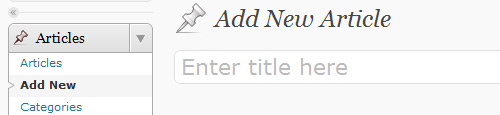
Have you ever wished you could change the wording of a built-in menu item or notification? If you’re a bit WordPress-savvy, you may have considered generating your own translations file. But you might not know that you can actually “hook” the translation functions in WordPress, capturing their input and modifying their output.
Be careful with this one. The code you put in this hook will run every time WordPress runs a string through its translation filters. Complex cases and conditionals could add a considerable amount of overhead, especially when loading pages filled with translation strings, such as the administrative pages. But if you just want to rename one thing that confuses your client (for example, maybe changing “Posts” to “Articles” for that corporate client who doesn’t “blog” yet), then these hooks can be very handy.
// hook the translation filters
add_filter( 'gettext', 'change_post_to_article' );
add_filter( 'ngettext', 'change_post_to_article' );
function change_post_to_article( $translated ) {
$translated = str_ireplace( 'Post', 'Article', $translated ); // ireplace is PHP5 only
return $translated;
}
Redirect Failed Log-Ins
Adding a log-in form to the front end of WordPress is pretty easy. WordPress 3.0 gave us the flexible wp_login_form() function, which displays a log-in form that can be customized with a number of arguments. By default, it will redirect the user back to the current page upon successful authentication, but we can also customize the redirect location.
wp_login_form(array( 'redirect' => site_url() )); // will redirect back to the website’s home page
There’s just one problem: it will only redirect upon successful authentication! If your idea was to hide the default WordPress log-in screen, then sending users who fail at a log-in attempt back to the default log-in screen probably isn’t ideal. Here’s a hook and some code that you can put in your functions.php file that will redirect failed log=ins to any location of your choosing.
add_action( 'wp_login_failed', 'my_front_end_login_fail' ); // hook failed login
function my_front_end_login_fail( $username ) {
$referrer = $_SERVER['HTTP_REFERER']; // where did the post submission come from?
// if there's a valid referrer, and it's not the default log-in screen
if ( !empty($referrer) && !strstr($referrer,'wp-login') && !strstr($referrer,'wp-admin') ) {
wp_redirect( $referrer . '?login=failed' ); // let's append some information (login=failed) to the URL for the theme to use
exit;
}
}
Adding Excerpts to Pages
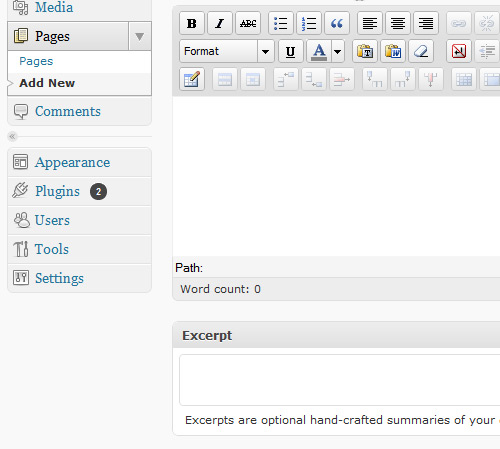
With the addition of support for custom post types, content types (including the built-in Post and Page types) are more like abstract objects. Each content type can support any number of core features, such as the HTML editor, titles, featured images and so forth. One of these core features is the “excerpt.” By default, Pages do not support excerpts. Did you know that adding excerpt support to the built-in Page type is as simple as adding a single line of code?
add_action( 'init', 'my_add_excerpts_to_pages' );
function my_add_excerpts_to_pages() {
add_post_type_support( 'page', 'excerpt' );
}
Technically, that was a couple of lines of code, but many themes already hook init, so the hook might not be necessary.
Add Body Classes Based on Special Conditions
If a theme is well constructed, then it would use the body_class() function to automatically generate classes for the body tag based on the properties of the page being viewed, like category, category-3, and logged-in.
Some websites may have sections that should share some styling but aren’t unified by any of the default classes generated by body_class. Say we want page ID 7, category ID 5 and the archive for the tag neat to share the body class neat-stuff, so that we can add a number of styling properties to them all without cluttering the style sheet.
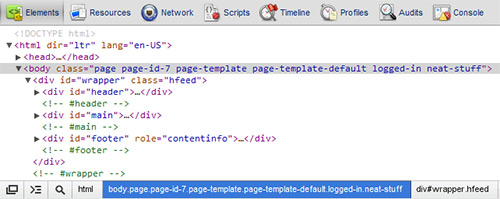
Luckily, we can hook the body_class() output!
add_filter( 'body_class', 'my_neat_body_class');
function my_neat_body_class( $classes ) {
if ( is_page(7) || is_category(5) || is_tag('neat') )
$classes[] = 'neat-stuff';
return $classes;
}
“You Can Have Settings Access, But Don’t Say We Didn’t Warn You!”
Clients often expect full administrative access (and rightly so), including access to settings pages. Let’s look at how we can hook admin “notices” (those warning boxes generated by some plug-ins) to send some warnings to administrative users when they are on settings pages.
add_action( 'admin_notices', 'my_admin_notice' );
function my_admin_notice(){
global $current_screen;</div>
if ( $current_screen->parent_base == 'options-general' )
echo '<div><p>Warning - changing settings on these pages may cause problems with your website’s design!</p></div>';
}

Remove the “Links” Menu Item
With WordPress increasingly being used for full website implementations, the blog roll and links feature is being used less and less. Thankfully, a new, little-known function added in WordPress 3.1 makes it very easy to remove unwanted menu items such as “Links.”
add_action( 'admin_menu', 'my_admin_menu' );
function my_admin_menu() {
remove_menu_page('link-manager.php');
}

Take Out the Dashboard News Feeds… and Add a New One of Your Own
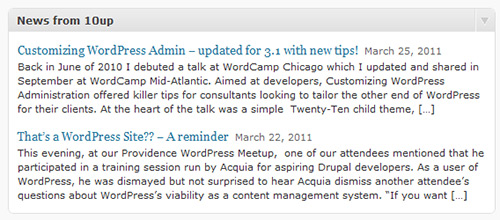
If you build WordPress websites for clients, then the number of WordPress news feeds loaded by default in the dashboard might be an annoyance. If you’re clever, you might just inject some of your own client’s news.
add_action('wp_dashboard_setup', 'my_dashboard_widgets');
function my_dashboard_widgets() {
global $wp_meta_boxes;
// remove unnecessary widgets
// var_dump( $wp_meta_boxes['dashboard'] ); // use to get all the widget IDs
unset(
$wp_meta_boxes['dashboard']['normal']['core']['dashboard_plugins'],
$wp_meta_boxes['dashboard']['side']['core']['dashboard_secondary'],
$wp_meta_boxes['dashboard']['side']['core']['dashboard_primary']
);
// add a custom dashboard widget
wp_add_dashboard_widget( 'dashboard_custom_feed', 'News from 10up', 'dashboard_custom_feed_output' ); //add new RSS feed output
}
function dashboard_custom_feed_output() {
echo '<div class="rss-widget">';
wp_widget_rss_output(array(
'url' => 'http://www.get10up.com/feed',
'title' => 'What\'s up at 10up',
'items' => 2,
'show_summary' => 1,
'show_author' => 0,
'show_date' => 1
));
echo "</div>";
}
Add Your Own Credits to the Administrative Footer
If you build WordPress websites for clients, then you should certainly make sure that WordPress gets its due. It wouldn’t hurt to sneak in a little credit to your agency either.
add_filter( 'admin_footer_text', 'my_admin_footer_text' );
function my_admin_footer_text( $default_text ) {
return '<span id="footer-thankyou">Website managed by <a href="http://www.get10up.com">10up</a><span> | Powered by <a href="http://www.wordpress.org">WordPress</a>';
}

Further Reading
Here are more tips for developers who build websites for clients:
- Customizing WordPress Administration with Twenty-Ten Child Theme
- 10 Techniques for Customizing the WordPress Admin Panel
More WordPress power tips from Smashing Magazine:
- Advanced Power Tips for WordPress Template Developers: Reloaded
- Advanced Power Tips for WordPress Template Developers
- Power Tips for WordPress Template Developers
(al) (il)


Nikunj
May 10th, 2011 1:00 amSuberb Tips Jacob, Never heard about any of them till now.
Henry
May 10th, 2011 1:02 amUseful tips, thanks!
suren H
May 11th, 2011 4:03 amIt is really good article to learn more about WordPress and especially the “screenshot of the pagination”. :-)
Đurica Bogosavljev
May 10th, 2011 1:03 amGreat tips with good examples! Bookmarked!!
Hope you will prepare more of these power tips for WordPress Template Developers in the future!
Christophe Debruel
May 10th, 2011 1:26 amWow nice list :D some good stuff in there that I probably use immediatly!
werner
May 10th, 2011 1:33 amAwesome tips – thanks for sharing! I’m looking forward for the next part ;)
Abban
May 10th, 2011 1:39 amI found a nice way to add custom styles to the WYSIWYG editor: http://dsgndepot.com/adding-styles-to-wordpress-tinymce/277
It adds a new styles dropdown which adds classes to selected text in the editor.
Vaibhav Jain
May 10th, 2011 1:57 amFeels so good to see these features in WordPress.
However, I feel they are pretty much similar to Drupal. The taxonmoy structure and the way hooks are implemented.
They way hook are implemented in drupal is a bit different but the logic is all the same.
But still WordPress Rocks !!!
Jamàlorg
May 10th, 2011 2:15 amGreat write up.
One thing I wanted to correct is that
empty()function only checks variables, and if you try to check anything other than variable withempty()function, it will cause a parse error; something like:I’m talking about the code provided under the section “The Underused Pagination Function”.
I would write it like this:
// get total number of pagesglobal $wp_query;
$total = $wp_query->max_num_pages;
// only bother with the rest if we have more than 1 page!
if ( $total > 1 ) {
// get the current page
if ( !$current_page = get_query_var('paged') )
$current_page = 1;
// structure of “format” depends on whether we’re using pretty permalinks
$permalink_structure = get_option('permalink_structure');
$format = empty( $permalink_structure ) ? '&page=%#%' : 'page/%#%/';
echo paginate_links(array(
'base' => get_pagenum_link(1) . '%_%',
'format' => $format,
'current' => $current_page,
'total' => $total,
'mid_size' => 4,
'type' => 'list'
));
}
Thanks for the awesome post. Waiting for more neat posts like this, Jacob.
cydfer
January 7th, 2012 7:26 amThanks for the help. I was getting that error message and had no idea where to begin!
Angga
May 10th, 2011 2:40 ami think there’s a typo here :
add_action( ‘admin_notices’, ‘my_admin_notice’ );
function my_admin_notice(){
global $current_screen;</div>
if ( $current_screen->parent_base == ‘options-general’ )
echo ‘Warning – changing settings on these pages may cause problems with your website’s design!’;
}
isn’t “global $current_screen;</div>” supposed to be global “$current_screen;”
Angga
May 10th, 2011 2:41 amwops somehow the tag didn’t show up. I was talking about this particular section : “You Can Have Settings Access, But Don’t Say We Didn’t Warn You!”
where there is extra div at the end of this line global $current_screen;
Bharat
May 10th, 2011 3:52 amyeah.. i have just look like this solution…
Jon H
May 10th, 2011 3:55 amI’ve used and loved WordPress for nearly five years now, but am feeling its limits more recently, especially with options like Expression Engine out there. For clients that want a custom post type with multiple fields, it just gets too complicated. No ability to have multiple rich text fields, and having the other custom fields limited to plain text instead of, say, a calendar or image selection, has made me look at alternatives for more involved projects.
Jamàlorg
May 10th, 2011 6:45 amC’mon, last time I developed a theme I was able to create lots of WYSIWYG fields via custom metaboxes, not only for custom post types but for standard posts and pages too.
Er… and that ExpressionEngine thing pisses me off in the first place. They want some of every penny I earn from a client work.
Jon H
May 10th, 2011 7:10 amMind sharing how?
phil jackson
May 10th, 2011 12:51 pm‘morefields’ plugin?
Jamàlorg
May 11th, 2011 6:29 amIf you’re familiar with WP code, you can create metaboxes. Just add the class
theEditorto the textarea you want to apply a WYSIWYG and you’re good to go.Also you can use a plugin. there are few plugins which can do this including the one mentioned by Phil Jackson in the above comment.
Rus Miller
May 16th, 2011 9:32 amAlso, Custom Field Template is fantastic. There’s a slight learning curve but it allows you to do almost anything using the WP custom fields, including rich text, selects, radio buttons, and assigning the template you create to a particular post type if you wish. I couldn’t live without it.
http://wordpress.org/extend/plugins/custom-field-template/
asher
May 11th, 2011 6:01 amI would suggest giving Drupal a spin –> proprietary CMS’s like Expression Engine and (gasp) Business Catalyst are really out of the realm of this article (they do take your hard earned money). Why –> because their License wouldn’t permit developers from selling “themes”.
Also it is kind of funny to see word press now doing what Drupal was years ago –
I think drupal is ahead of the curve — as a software product. Of course WordPress does have more people making themes, and is easier to understand with an “out of the box” install.
Rus Miller
May 16th, 2011 9:43 amI’m not bashing Drupal because I know there’re a lot of dedicated and smart people working on it. However, I think WP is just allowing for functionality common to all CMS’s, which it wasn’t until very recently. I’ve built several Drupal sites and I found the process extraordinarily painful. So, when WP 2.8 came out I jumped on it and never looked back. The documentation is crystal clear, the support forums are filled with great people and the code is well-documented and easy to find. WP may not be as robust as Drupal, but in the 3 years I’ve been working with it I’ve not found it to be limiting and I keep discovering more things I can do with it.
Chris
May 11th, 2011 6:55 amIt looks like the author of this article developed a plugin to do just this…
http://www.get10up.com/plugins/secondary-html-content-wordpress/
I haven’t tried it, so I can’t really vouch for it – but the guy has some credibility for writing here, so check it out! Looks like he has some other quality plugins, too.
Nathan B
May 10th, 2011 6:13 amExcellent, much needed, will use. Thanks!
Dorival
May 10th, 2011 6:23 amI wish I could have multiple homes based on categories for example. i.e: example.com (home) and example.com/games (games home), like a news portal.
Kevin
May 10th, 2011 6:28 amNice, I love playing around with WordPress’ core functions via hooks, I just wish there was better documentation for all of them! You’ve brought up a couple of good ones…like the admin_menu hook, I recently developed a plugin for our website which utilized hooks and CSS to style the Admin section of WordPress depending on user roles. It probably would have been programmatically correct to use those hooks to disable menu items, but I resorted to my good old friend, display: none;
…
Don’t judge me! Now that I know about a few more of these, I’ll be using them instead of a CSS solution! Thanks!
Jeffrey Friend
May 10th, 2011 6:44 amGreat tips! Love the “Articles” tip, and especially the “Admin Notice”! I’ve had a client or two decide to “see what happens”. It always turns out badly for them! ;-)
abdusfauzi
May 10th, 2011 6:59 amwell written tips! thanks!
devo
May 10th, 2011 7:13 amThese are amazing and some (like renaming posts), I’ve been wondering about for a while.
Unsetting the Dashboard panels is much easier this way though (and adding the action to the “admin_menu” gets all of them this way):
add_action( ‘admin_menu’, ‘remove_meta_boxen’ );
function remove_meta_boxen() {
remove_meta_box( ‘dashboard_secondary’, ‘dashboard’, ‘normal’ ); //Other WordPress News
remove_meta_box( ‘dashboard_right_now’, ‘dashboard’, ‘normal’ );
remove_meta_box( ‘dashboard_incoming_links’, ‘dashboard’, ‘normal’ );
remove_meta_box( ‘dashboard_plugins’, ‘dashboard’, ‘normal’ );
remove_meta_box( ‘dashboard_quick_press’, ‘dashboard’, ‘normal’ );
remove_meta_box( ‘dashboard_primary’, ‘dashboard’, ‘normal’ ); //Wordpress Blog
remove_meta_box( ‘dashboard_recent_drafts’, ‘dashboard’, ‘normal’ );
remove_meta_box( ‘dashboard_recent_comments’, ‘dashboard’, ‘normal’ );
}
Michael Gorman
May 10th, 2011 7:32 amI especially loved the warning on the settings pages. Thanks!
steve.mg
May 10th, 2011 8:13 amHere’s another great tip from a WordPress customer: Screenshots, Screenshots, examples, Screenshots! Take a couple of extra minutes use whatever graphical editing software you can get your hands on and take screenshots.
zentur
May 10th, 2011 8:21 amjust tried the redirect wrong login snippet works great till someone enters wrong credentials more than once. Small fix which works for me add_action( ‘wp_login_failed’, ‘my_front_end_login_fail’ ); // hook failed login
function my_front_end_login_fail( $username ) {
$referrer = $_SERVER['HTTP_REFERER']; // where did the post submission come from?
// if there’s a valid referrer, and it’s not the default log-in screen
if ( !empty($referrer) && !strstr($referrer,’wp-login’) && !strstr($referrer,’wp-admin’) && !strstr($referrer, ‘failed’) )
{
wp_redirect( $referrer . ‘?login=failed’ ); // let’s append some information (login=failed) to the URL for the theme to use
exit;
}
else
{
wp_redirect( $referrer); //if user entered credentials wrong again just use the login failed referrer again
exit;
}
}
?>
Andy
May 10th, 2011 10:49 amI’m interested in removing some of those Dashboard Panels and putting in my own based off of RSS Feeds. Where do I put this code? index.php? Anyone wanna tell me because I’m either losing it or I don’t see where you would put this code.
Devo
May 10th, 2011 3:36 pmIn your functions.php file.
Jeremy Hixon
May 10th, 2011 12:50 pmI love the concept of customizing a WordPress install for clients. I haven’t really delved into publicly available templates yet, but if/when I do things like this will be very useful. Thanks for the information.
STeveR
May 10th, 2011 6:14 pmHey, I’m new to WP and looking for some good books / sites to start with. Any suggestions on where to start?
I’m a developer by trade C++, Java, a bit of PHP as well. Just don’t want to waste time with bad books etc.
Bogdan Pop
May 10th, 2011 10:00 pmDigging into WordPress by Chris Coyier
Dwayne
May 10th, 2011 8:17 pmI wasn’t honestly expecting much from this article going on the title, but this was a pretty damn good article brotato. I’ve been developing with WordPress for a couple of years and I’ve just learned a couple of things.
Dwayne.
ilikekillnerds.com
Bogdan Pop
May 10th, 2011 9:59 pmGreat little tutorial!
Dawid Surowiec
May 11th, 2011 3:59 amNice one i really needed something like this ;)
thecodezombie
May 11th, 2011 7:42 amNice little collection of snippets.
I’ve been using a few of these already…I bundled them into an mu-plugin (for personal use) to apply to all clients’ sites.
Used the translation tip to change ‘Howdy’ to ‘Welcome’ (serious client).
Changed the admin footer to include developer name (and e-mail).
Removal of inappropriate dashboard items to add client’s news feed.
I also used a little snippet to remove the ‘Update Nag’…
function tb_remove_update_nag($matches) {
global $userdata;
if (!current_user_can(‘update_plugins’))
remove_action(‘admin_notices’, ‘update_nag’, 3);
}
Just a suggestion, on your Dashboard function to pull in the client’s own posts, would it not be better to use…
‘url’ => site_url(‘/feed/’),
‘title’ => ‘News from ‘.bloginfo(‘name’)
…so the information isn’t all hard-coded?
Another cool use of the action ‘admin_head is to add CSS that swaps out the default WP-icons with a sprited Fugue set (looks much nicer / professional)…again I have this in my mu-plugin.
Ali
May 11th, 2011 1:14 pmThis is a brilliant tutorial on wordpress!
I host my clients websites and this helps a lot – its so true about clients not understanding “posts”, i didnt even think it would be this easy to change it.
Do you know if there is a plugin to manage this all?
Ali @ iClickster.com/hosting
myshock
May 11th, 2011 2:07 pmNice article.
It would be nice to speak more often about wordpress accessibility tweaks or plugins.
Brett
May 11th, 2011 11:38 pmWhy would you repurpose something designed for blogging into a CMS when there are already very good CMS systems out there? Like Joomla! and Drupal. Joomla! is free has an excellent support network and superb extensions for additional functionality. IMHO its far better than wordpress for Content Management as that is what it was originally designed for. So “like driving a tractor trailer to go around the block. There’s usually a lighter, smarter way: a bike or even a car.” – no its like riding a tricycle
Patrick
May 12th, 2011 5:04 amThis article is fantastic!
It covers so many areas of Admin customisation seldom seen on other tutorials. The admin credits feature is something I would never have thought of, but I’ll definitely be using it from now on!
Thanks for taking the time to put this together!
Patrick
Russell Aaron
May 12th, 2011 8:13 amYou guys always have the best tips. I cant wait to move forward with WordPress
rob
May 12th, 2011 11:16 amGreat post lads, really love w/p & reading your good content tips
Regards
Rob
hearts.ie
Deryck
May 12th, 2011 12:10 pmThanks a lot for this useful tips Jacob and Smashing. I’m wondering if I can redirect failures in register page too. It’s possible?
Tamuir
May 13th, 2011 3:39 amWordPress tips discussed here are very informative…. and very well written.
Thanks alot for your time and effort.
Adi Pranadipa
May 13th, 2011 5:07 amAwesome Post, Jacob..
my client are very pleased with wordpress for thir sites project..
and this is really usefull for me..
time to practice it..
Melanie Richards
May 13th, 2011 7:01 pmTalk about good timing—this post came right at the beginning of a new WP project. Thanks for the tips; there’s a few that I’ll certainly be implementing!
Pali Madra
May 14th, 2011 3:10 amThank you Jacob for all the hard work of putting this together. Every trick is worth it. This is God sent for people like me who love to work on WordPress.
BTW I was curious as to how much time it has taken you to come up with this post?
Thanks once again
Christopher
May 15th, 2011 8:21 amI always forget that CSS holds so many boss gems! Now to appropriately implement them….
tejas
May 15th, 2011 9:44 pmI would have hoped you touched the WP_nav_menu and its walker classes. That is a very hidden capability most developers don’t know about but can make wonderful use of.
Some options are restriction menu items based on roles, displaying the description under links, etc.
Thiago
May 17th, 2011 4:51 amThis week I had a problem trying to install wp events calendar plugin on my custom template. It works fine on the twentyten template but is completely broken on my own. I figured the plugin generates line in the head section to include the proper javascript and css but it wasn’t able to include those lines on my template header. I understand is important to have the wp_footer() function on the footer section, but I couldn’t figure it out how to make the plugin change the header section of my template. What have I made wrong ?
Dijo David
May 17th, 2011 8:22 pmAwesome article! Really good tips. I m totally in love with WordPress :)
agung ghu
May 19th, 2011 3:06 amHi, thanks a lot for the report…I tend to generate templates in Photoshop and tehre is a question emerged recently: is there any feature that would let me publish psd templates to WordPress?
Buhomir
May 20th, 2011 12:45 amhello! i firmly publish templates right from PS having installed special plugin, called Divine Elemente. if there is no coding experience, this might be one of the best choices. try that.
Buhomir
May 23rd, 2011 5:33 amI forgot to leave the website name: elemente.divine-project (dot) com
The good software for psd to wordpress publishing
Vin Carrillo
June 15th, 2011 3:05 pm“I Wish Posts Were Called Articles For My Client.”
Did not work for me. Probably because your instructions were so ambiguous only someone with PHP experience would know where to put your coding.
If you know where to put the code why not mention that in your article too?
Varemenos
July 3rd, 2011 12:30 pmAwesome, thanks for this great article.
Keep them coming!
Elliott
July 8th, 2011 12:30 pmThanks ! Was working on customising the admin dashboard for our clients and you have gave me new ideas =D
jessica
September 8th, 2011 10:21 amSuper awesome article! Will definitely use a few of these.
Ian Briggs
October 18th, 2011 3:34 amIf I am running Multisite however, how can I add these functions so they stick across all the sites.
I don’t want to edit every functions.php on every site. Is there a common location I can put these functions?
Cheers.
niko
January 26th, 2012 11:06 amIf you want to rename more than the Posts button you can use this code.
function change_post_to_article( $translated ) {
$search= array(‘Posts’, ‘Media’);
$pin = array(‘Articles’, ‘Pictures’);
$translated = str_ireplace( $search, $pin, $translated ); // ireplace is PHP5 only
return $translated;
}
Konstantin Kovshenin
April 16th, 2012 7:29 amI’d argue around your “I wish posts were called articles for my client” part. Why would you run a replace function on each an every call to gettext and ngettext? Not only is that inefficient, but it will also break when you want to change your posts to “news” and you’ll end up with labels like “Delete Newss”. Also, it might (and probably will) break some other non-related translations, like “post by e-mail” will become “article by e-mail”, and “post a comment” will become “article a comment” — wtf?
The correct solution probably lies somewhere around the $wp_post_types globals, register_post_type and get_post_type_labels.
~ K
fajar
May 26th, 2012 6:10 pmGreatttt!!! i like this post.plugin isn’t good.just manually
jojalamic
August 21st, 2012 10:52 amHello!
The Underused Pagination Function
Is it possible to change the HTML generated by that code for the Pagination Function, or to add some html ?
I’d like to add a separator “/” to each page number.
Guill3m
February 6th, 2013 1:01 pmI imagine you can add that separator with the
add_fragmentparameter (http://codex.wordpress.org/Function_Reference/paginate_links).Not completely sure however since I haven’t tried it yet.