How To Create Custom Post Meta Boxes In WordPress
What seems like one of the most complicated bits of functionality in WordPress is adding meta boxes to the post editing screen. This complexity only grows as more and more tutorials are written on the process with weird loops and arrays. Even meta box “frameworks” have been developed. I’ll let you in on a little secret though: it’s not that complicated.

Creating custom meta boxes is extremely simple, at least it is once you’ve created your first one using the tools baked into WordPress’ core code. In this tutorial, I’ll walk you through everything you need to know about meta boxes:
- Creating meta boxes.
- Using meta boxes with any post type.
- Handling data validation.
- Saving custom meta data.
- Retrieving custom meta data on the front end.
Note: When I use the term “post” throughout this tutorial, I’m referring to a post of any post type, not just the default blog post type bundled with WordPress.
What is a post meta box?
A post meta box is a draggable box shown on the post editing screen. Its purpose is to allow the user to select or enter information in addition to the main post content. This information should be related to the post in some way.
Generally, two types of data is entered into meta boxes:
- Metadata (i.e. custom fields),
- Taxonomy terms.
Of course, there are other possible uses, but those two are the most common. For the purposes of this tutorial, you’ll be learning how to develop meta boxes that handle custom post metadata.
What is post metadata?
Post metadata is data that’s saved in the wp_postmeta table in the database. Each entry is saved as four fields in this table:
meta_id: A unique ID for this specific metadata.post_id: The post ID this metadata is attached to.meta_key: A key used to identify the data (you’ll work with this often).meta_value: The value of the metadata.
In the following screenshot, you can see how this looks in the database.
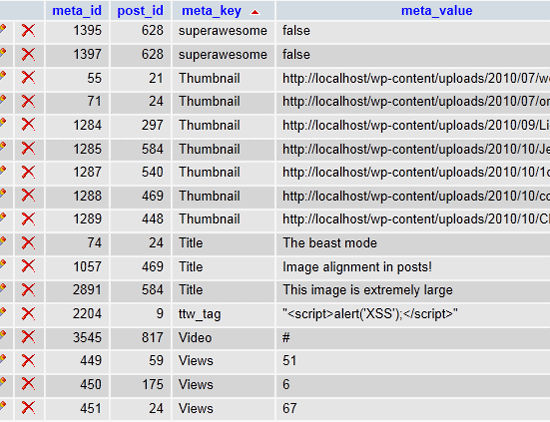
When you get right down to it, metadata is just key/value pairs saved for a specific post. This allows you to add all sorts of custom data to your posts. It is especially useful when you’re developing custom post types.
The only limit is your imagination.
Note: One thing to keep in mind is that a single meta key can have multiple meta values. This isn’t a common use, but it can be extremely powerful.
Working with post metadata
By now, you’re probably itching to build some custom meta boxes. However, to understand how custom meta boxes are useful, you must understand how to add, update, delete, and get post metadata.
I could write a book on the various ways to use metadata, but that’s not the main purpose of this tutorial. You can use the following links to learn how the post meta functions work in WordPress if you’re unfamiliar with them.
- add_post_meta(): Adds post metadata.
- update_post_meta(): Updates post metadata.
- delete_post_meta(): Deletes post metadata.
- get_post_meta(): Retrieves post metadata.
The remainder of this tutorial assumes that you’re at least familiar with how these functions work.
The setup
Before building meta boxes, you must have some ideas about what type of metadata you want to use. This tutorial will focus on building a meta box that saves a custom post CSS class, which can be used to style posts.
I’ll start you off by teaching you to develop custom code that does a few extremely simple things:
- Adds an input box for you to add a custom post class (the meta box).
- Saves the post class for the
smashing_post_classmeta key. - Filters the
post_classhook to add your custom post class.
You can do much more complex things with meta boxes, but you need to learn the basics first.
All of the PHP code in the following sections goes into either your custom plugin file or your theme’s functions.php file.
Building a custom post meta box
Now that you know what you’re building, it’s time to start diving into some code. The first two code snippets in this section of the tutorial are mostly about setting everything up for the meta box functionality.
Since you only want your post meta box to appear on the post editor screen in the admin, you’ll use the load-post.php and load-post-new.php hooks to initialize your meta box code.
/* Fire our meta box setup function on the post editor screen. */ add_action( 'load-post.php', 'smashing_post_meta_boxes_setup' ); add_action( 'load-post-new.php', 'smashing_post_meta_boxes_setup' );
Most WordPress developers should be familiar with how hooks work, so this should not be anything new to you. The above code tells WordPress that you want to fire the smashing_post_meta_boxes_setup function on the post editor screen. The next step is to create this function.
The following code snippet will add your meta box creation function to the add_meta_boxes hook. WordPress provides this hook to add meta boxes.
/* Meta box setup function. */
function smashing_post_meta_boxes_setup() {
/* Add meta boxes on the 'add_meta_boxes' hook. */
add_action( 'add_meta_boxes', 'smashing_add_post_meta_boxes' );
}
Now, you can get into the fun stuff.
In the above code snippet, you added the smashing_add_post_meta_boxes() function to the add_meta_boxes hook. This function’s purpose should be to add post meta boxes.
In the next example, you’ll create a single meta box using the add_meta_box() WordPress function. However, you can add as many meta boxes as you like at this point when developing your own projects.
Before proceeding, let’s look at the add_meta_box() function:
add_meta_box( $id, $title, $callback, $page, $context = 'advanced', $priority = 'default', $callback_args = null );
$id: This is a unique ID assigned to your meta box. It should have a unique prefix and be valid HTML.$title: The title of the meta box. Remember to internationalize this for translators.$callback: The callback function that displays the output of your meta box.$page: The admin page to display the meta box on. In our case, this would be the name of the post type (post,page, or a custom post type).$context: Where on the page the meta box should be shown. The available options arenormal,advanced, andside.$priority: How high/low the meta box should be prioritized. The available options aredefault,core,high, andlow.$callback_args: An array of custom arguments you can pass to your$callbackfunction as the second parameter.
The following code will add the post class meta box to the post editor screen.
/* Create one or more meta boxes to be displayed on the post editor screen. */
function smashing_add_post_meta_boxes() {
add_meta_box(
'smashing-post-class', // Unique ID
esc_html__( 'Post Class', 'example' ), // Title
'smashing_post_class_meta_box', // Callback function
'post', // Admin page (or post type)
'side', // Context
'default' // Priority
);
}
You still need to display the meta box’s HTML though. That’s where the smashing_post_class_meta_box() function comes in ($callback parameter from above).
/* Display the post meta box. */
function smashing_post_class_meta_box( $object, $box ) { ?>
<?php wp_nonce_field( basename( __FILE__ ), 'smashing_post_class_nonce' ); ?>
<p>
<label for="smashing-post-class"><?php _e( "Add a custom CSS class, which will be applied to WordPress' post class.", 'example' ); ?></label>
<br />
<input class="widefat" type="text" name="smashing-post-class" id="smashing-post-class" value="<?php echo esc_attr( get_post_meta( $object->ID, 'smashing_post_class', true ) ); ?>" size="30" />
</p>
<?php }
What the above function does is display the HTML output for your meta box. It displays a hidden nonce input (you can read more about nonces on the WordPress Codex). It then displays an input element for adding a custom post class as well as output the custom class if one has been input.
At this point, you should have a nice-looking meta box on your post editing screen. It should look like the following screenshot.
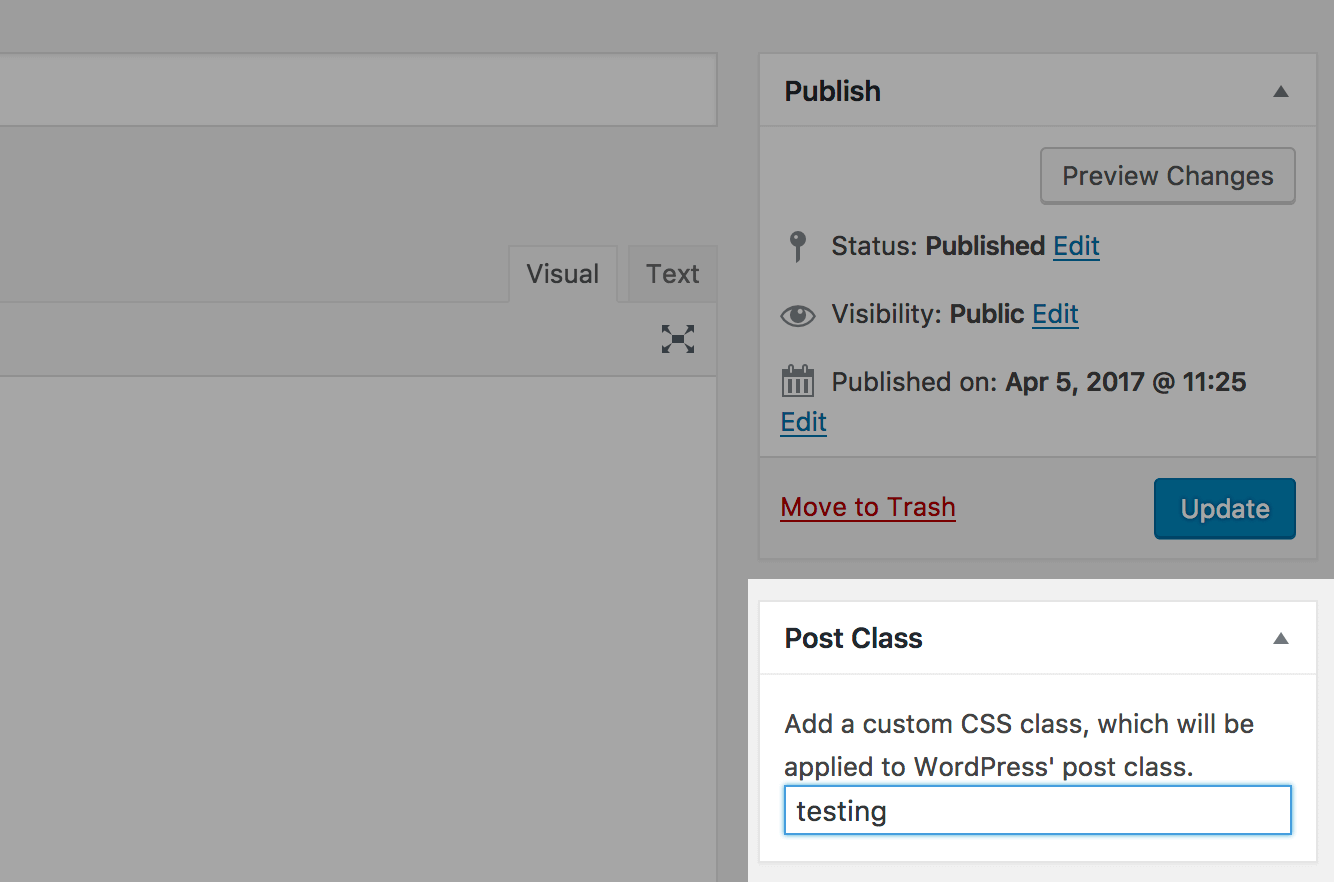
The meta box doesn’t actually do anything yet though. For example, it won’t save your custom post class. That’s what the next section of this tutorial is about.
Saving the meta box data
Now that you’ve learned how to create a meta box, it’s time to learn how to save post metadata.
Remember that smashing_post_meta_boxes_setup() function you created earlier? You need to modify that a bit. You’ll want to add the following code to it.
/* Save post meta on the 'save_post' hook. */ add_action( 'save_post', 'smashing_save_post_class_meta', 10, 2 );
So, that function will actually look like this:
/* Meta box setup function. */
function smashing_post_meta_boxes_setup() {
/* Add meta boxes on the 'add_meta_boxes' hook. */
add_action( 'add_meta_boxes', 'smashing_add_post_meta_boxes' );
/* Save post meta on the 'save_post' hook. */
add_action( 'save_post', 'smashing_save_post_class_meta', 10, 2 );
}
The new code you’re adding tells WordPress that you want to run a custom function on the save_post hook. This function will save, update, or delete your custom post meta.
When saving post meta, your function needs to run through a number of processes:
- Verify the nonce set in the meta box function.
- Check that the current user has permission to edit the post.
- Grab the posted input value from
$_POST. - Decide whether the meta should be added, updated, or deleted based on the posted value and the old value.
I’ve left the following function somewhat generic so that you’ll have a little flexibility when developing your own meta boxes. It is the final snippet of code that you’ll need to save the metadata for your custom post class meta box.
/* Save the meta box's post metadata. */
function smashing_save_post_class_meta( $post_id, $post ) {
/* Verify the nonce before proceeding. */
if ( !isset( $_POST['smashing_post_class_nonce'] ) || !wp_verify_nonce( $_POST['smashing_post_class_nonce'], basename( __FILE__ ) ) )
return $post_id;
/* Get the post type object. */
$post_type = get_post_type_object( $post->post_type );
/* Check if the current user has permission to edit the post. */
if ( !current_user_can( $post_type->cap->edit_post, $post_id ) )
return $post_id;
/* Get the posted data and sanitize it for use as an HTML class. */
$new_meta_value = ( isset( $_POST['smashing-post-class'] ) ? sanitize_html_class( $_POST['smashing-post-class'] ) : '' );
/* Get the meta key. */
$meta_key = 'smashing_post_class';
/* Get the meta value of the custom field key. */
$meta_value = get_post_meta( $post_id, $meta_key, true );
/* If a new meta value was added and there was no previous value, add it. */
if ( $new_meta_value && '' == $meta_value )
add_post_meta( $post_id, $meta_key, $new_meta_value, true );
/* If the new meta value does not match the old value, update it. */
elseif ( $new_meta_value && $new_meta_value != $meta_value )
update_post_meta( $post_id, $meta_key, $new_meta_value );
/* If there is no new meta value but an old value exists, delete it. */
elseif ( '' == $new_meta_value && $meta_value )
delete_post_meta( $post_id, $meta_key, $meta_value );
}
At this point, you can save, update, or delete the data in the “Post Class” meta box you created from the post editor screen.
Using the metadata from meta boxes
So you have a custom post meta box that works, but you still need to do something with the metadata that it saves. That’s the point of creating meta boxes. What to do with your metadata will change from project to project, so this is not something I can answer for you. However, you will learn how to use the metadata from the meta box you’ve created.
Since you’ve been building a meta box that allows a user to input a custom post class, you’ll need to filter WordPress’ post_class hook so that the custom class appears alongside the other post classes.
Remember that get_post_meta() function from much earlier in the tutorial? You’ll need that too.
The following code adds the custom post class (if one is given) from your custom meta box.
/* Filter the post class hook with our custom post class function. */
add_filter( 'post_class', 'smashing_post_class' );
function smashing_post_class( $classes ) {
/* Get the current post ID. */
$post_id = get_the_ID();
/* If we have a post ID, proceed. */
if ( !empty( $post_id ) ) {
/* Get the custom post class. */
$post_class = get_post_meta( $post_id, 'smashing_post_class', true );
/* If a post class was input, sanitize it and add it to the post class array. */
if ( !empty( $post_class ) )
$classes[] = sanitize_html_class( $post_class );
}
return $classes;
}
If you look at the source code of the page where this post is shown on the front end of the site, you’ll see something like the following screenshot.
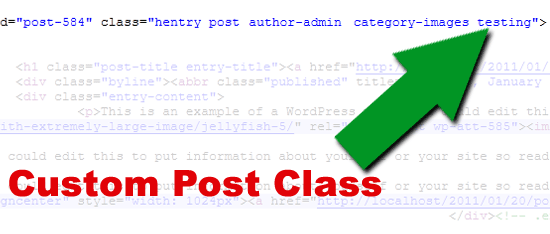
Pretty cool, right? You can use this custom class to style posts however you want in your theme’s stylesheet.
Security
One thing you should keep in mind when saving data is security. Security is a lengthy topic and is outside the scope of this article. However, I thought it best to at least remind you to keep security in mind.
You’ve already been given a link explaining nonces earlier in this tutorial. The other resource I want to provide you with is the WordPress Codex guide on data validation. This documentation will be your best friend when learning how to save post metadata and will provide you with the tools you’ll need for keeping your plugins/themes secure.
Bonus points to anyone who can name all of the security measures used throughout this tutorial.
Create a custom meta box
Once you’ve copied, pasted, and tested the bits of pieces of code from this tutorial, I encourage you to try out something even more complex. If you really want to see how powerful meta boxes and post metadata can be, try doing something with a single meta key and multiple meta values for that key (it’s challenging).
I hope you’ve enjoyed the tutorial. Feel free to post questions about creating meta boxes in the comments.
Related Resources
- Extend WordPress With Custom Fields
- Better Image Management With WordPress
- WordPress Power Tips For Template Developers And Consultants
- How To Integrate Facebook With WordPress
(al)


Russell Heimlich
October 4th, 2011 8:40 amMetaboxes are such a key part of how we publish that I abstracted my own metabox class so I could create them with a few lines. You can also use whatever HTML you want and my script will parse the HTML to find the value attributes and fill in the data automagically!
You can poke around the code here -> http://svn.kingkool68.com/projects/metabox/
Acts7
October 4th, 2011 8:45 amSUPER article. Thank you for simplifying what so many people have gone to great lengths to complicate!
In a way of advancing this post – do you have an easy (non-plugin way) to add the tinyMCE (aka wysiwyg) while adding the metabox.
David
October 6th, 2011 7:18 amThis is the code I use for a Tinmyce metabox:
function myplugin_inner_custom_box() {
// The actual fields for data entry
$pid = $_GET['post'];
global $wpdb;
$value = ”;
$valori = $wpdb->get_results(“SELECT meta_value FROM wp_postmeta WHERE post_id = $pid AND meta_key = ‘meta_key_name’”);
foreach ($valori as $val) {
$value = $val->meta_value;
}
echo ‘<textarea id=”meta_key_name_box” type=”text” name=”meta_key_name” style=”width: 300px;margin-left: 30px”>’.$value.’</textarea>’;
echo ‘<script type=”text/javascript”>
/* <![CDATA[ */
jQuery(document).ready( function () {
if ( typeof( tinyMCE ) == "object" && typeof( tinyMCE.execCommand ) == "function" ) {
tinyMCE.execCommand("mceAddControl", true, "meta_key_name_box");
}
});
/* ]]> */
</script>’;
}
Unfortunately it’s got some problems (it does’nt save new paragraphs and has no wysiwyg/html switch)
wowmakers
October 4th, 2011 8:52 amWow ! Really helps in my current project :) Thanks a lot Justin – I’m a regular reader of your blog :)
sarah
October 4th, 2011 9:38 amtotally wish I had read this before I went custom field happy on my last project..
mikaweb
October 4th, 2011 9:46 amQuick question: Is that possible to load everything in the backend and using non-WP tables? I’m currently a plugin (more an application) and I need to have my own tables for many reasons.
I just want to know if I can create, let’s say a Player interface, without using the postmeta or post tables?
Thanks.
Mika’
Acts7
October 4th, 2011 11:06 am@mikaweb
I think this is what you’re looking for:
http://codex.wordpress.org/Displaying_Posts_Using_a_Custom_Select_Query
Of course you’d have to customize to call your custom tables
Adam
October 4th, 2011 9:47 amGood post…..any idea how to save your custom post meta box when the ajax save draft function is called?
guillaume
October 5th, 2011 1:35 amThe autosave function doesn’t save metadata correctly, this is a known WP bug and should be fixed in a next release. That’s why I disable autosave :)
Randy
October 4th, 2011 10:34 amI can only reinforce that it is SO important to be sure you only add the custom meta if the POST data exists as you have displayed above. I recently looked at a database for another WP site and there were around 60 empty database entries for every single post and page simply because there was no validation of content.
BTW – The book is incredible if anyone is reading this comment. I have not bought a WP book since this one. Invaluable resource!
esc_html__ , wp_nonce_field, wp_verify_nonce, current_user_can, sanitize_html_class
Did I miss any?
Justin Tadlock
October 4th, 2011 11:13 amYou’ve been awarded 10 bonus points from Justin!
Randy
October 4th, 2011 11:20 amAwesome! I’ll use them toward your next book! hehe!
rogaroga
October 4th, 2011 12:18 pminteresting post.
i was wondering if it’s possible to use the custom meta box to display a list of the attachments linked to a post ?
Russell Heimlich
October 4th, 2011 12:58 pmSure! You just wouldn’t need anything about saving or updating meta data. You could write the code to display something in the smashing_post_class_meta_box() function.
rogaroga
October 4th, 2011 2:07 pmI was thinking about checkboxes in front of each item of the list to select some images to be added in a slideshow,
or a another one with radio button to select an image as a background for example.
Rahe
October 4th, 2011 12:19 pmHi,
Good post, but if anyone want to make this very scalable and dynamically, you can use the WP_Alchemy classes.
Very good class support media upload, multi fields and more feature like displaying metaboxes for one post_type or more for more infos :
http://www.farinspace.com/wpalchemy-metabox/
Brian
October 4th, 2011 6:10 pmI whole heartedly agree. By using the WP_Alchemy class you are able to build multiple, dynamically generated metaboxes, and setting up the back and front end is a breeze, I highly recommend anyone that uses metaboxes on a regular basis to try WP_Alchemy, you will not be disappointed, in fact it will be one of those “I can’t live with out it” pieces of code.
Phoe
October 26th, 2011 3:20 amHow is WpAlchemy different from using Custom Fields or Custom Post Type?
Mike Wilson
October 5th, 2011 7:37 amI was about to post the very same suggestion! WPAlchemy rocks!!! +1
Justin Tadlock
October 6th, 2011 1:07 pmThis is one of the exact reasons I decided to write this tutorial.
Francis
November 16th, 2011 7:56 amJustin > Don’t like WPalchemy ? For a lot of non-devs/designers, it is really helpful and simple to use, no ?
Roc
October 4th, 2011 12:28 pmI believe this nifty little plugin can do just that, it’s very powerful
http://wordpress.org/extend/plugins/more-fields/
and check their “More Types” plugin too.
Justin Tadlock
October 6th, 2011 1:04 pmHow would the plugin/theme I develop use More Fields to serve up custom meta boxes to my plugin/theme users?
Syed Balkhi
October 6th, 2011 8:13 pmI agree that More Fields is a great plugin, but when creating themes to distribute for free or commercially, then this tutorial will be handy.
It’d be freaking nice if More Fields can have an option to grab code….. just like Custom Post Types UI plugin does.
TCBarrett
October 4th, 2011 1:32 pmIs there a WordPress specific advantage to explicitly covering the add_post_meta() case?
Justin Tadlock
October 4th, 2011 1:58 pmNot really.
update_post_meta()will be perfectly fine for that use case. I just wanted to show how the post meta functions could be used.Emil
October 4th, 2011 2:11 pmVery useful tut – thanks bro!
Dustin McGrew
October 4th, 2011 7:33 pmWith all due respect.. and I mean that truthfully.. I’d love to see some posts about CMSs other than WordPress. Seems like almost every web development post here is about WordPress. Would love to see some Drupal posts. More CSS and jQuery is never a bad thing either.
Justin Tadlock
October 4th, 2011 11:36 pmThis is the WordPress section of the site.
Dman
October 5th, 2011 8:44 amBest. Comment. Ever.
Michael Beckwith
October 4th, 2011 10:21 pmVery nice work Justin. I used this to re-do my “template” file for my metabox uses, and hope to make it more efficient now.
S3bY
October 5th, 2011 12:46 amVery nice explained! When I was building my website I tried for days to make them work! And in the end, I gave up and used a plugin! :)) (It was the first time I was building a wordpress theme)
Now, I will try again..
Silverman
October 5th, 2011 3:52 amThank you very much for the tutorial, but I can’t see clearly which file every snippet belongs.
Julius
October 5th, 2011 10:56 am“All of the PHP code in the following sections goes into either your custom plugin file or your theme’s functions.php file.”
Silverman
October 5th, 2011 8:31 pmThanks Julius!!
Jim
October 5th, 2011 5:39 amWhy is that whenever I read a crystal-clear explanation of some WordPress voodoo, it is written by Justin Tadlock?
OK, there are a few others but Justin is doing more than anybody I can name to take us from newbies to experts.
Thanks so much.
John Surdakowski
October 5th, 2011 6:58 amGreat article Justin. As always.
stephan
October 5th, 2011 10:01 amactually i am loving you.
Raashid
October 5th, 2011 10:26 amThis is new to me, thanks a lot :)
raffi
October 6th, 2011 2:10 amGreat article, I am building a website in which I wanted to have customs fields which change depending on the page type being created, without the hassle of having to go through the current customs field input.
The info the is missing for me is how you can add multiple meta keys and values to the single meta box. any chance for a hint?
Seamus
October 6th, 2011 8:40 amHonestly, plugin : Advanced Custom Fields enough said.
Justin Tadlock
October 6th, 2011 1:02 pmHow would the plugin/theme I develop use Advanced Custom Fields to serve up custom meta boxes to my plugin/theme users?
Jason Pelker
October 6th, 2011 7:22 pmI love Justin Tadlock! For years, his site has been the most precise and knowledgeable source for WordPress info. It’s great that he’s in Smashing now!
Konstantin Kovshenin
October 7th, 2011 12:25 amSo great to see Justin contributing to Smashing Magazine, good job! Loving the article too and hey, have you seen the post options API project we’ve been working on lately? Cheers!
Geraint
October 7th, 2011 1:39 amFirst off awesome post!
Secondly if you dont want you custom meta item to appear under the custom fields as well as in you new meta box, you need to prefix it with an “_” i.e. “smashing_post_class” => “_smashing_post_class”
Paul
October 7th, 2011 2:10 amGreat explanation as always. I’d love to see a follow up on creating more complex fields such as dropdowns, radio, checkboxes, colorpickers,…
Vincent
October 7th, 2011 2:40 amI think many of us are a little confused as to the differences and when best to use meta boxes versus custom fields. Please can Justin do a ‘lay person’ explanation/tutorial with real World examples?
Also would like to see these things be part of WP core with a UI rather than delving into raw code.
I know there a few plugins that do this, but many would prefer it in core for sake of security and assurance.
Hope Santa is listening :-)
Justin Tadlock
October 8th, 2011 10:35 pmI’m not sure I understand the question. Post metadata is the same thing as a custom field.
It’d be impossible for core to handle the security side of things with custom meta boxes. There’s no way for core to know how to validate/sanitize the data since the data is custom.
Steps can certainly be taken to make a stronger API in core for developers though.
Vincent
October 12th, 2011 1:10 amHi Justin,
I meant WP core to include something like this functionality:
http://codecanyon.net/item/easy-custom-content-types-for-wordpress/234182
Sungjin
May 22nd, 2012 6:34 pmAll my posts have manual execprt or no execprts.When I tried to repeat it in order to answer your questions, I was unable to repeat it. Excerpt Editor sets WP to display the most recent post in full and all other at the front page with execprt.When I double-click on the execprt it makes no difference whether I double-click on the text or the image FEE opens the editor with the main content or entry. My guess is that EE has intercepted the normal display of post contents and replaced it with the execprts for all posts except the first. So, to FEE, this looks like a normal post. It therefore display the post content, which is not the execprt.OK, I am just guessing If you want more detailed feedback, I will take at look at it, perhaps not before in the beginning of the next week, I am afraid.
Bjorn van der Neut
October 7th, 2011 6:14 amJustin nice article! One thing I miss here is if I want to validate the input like emailadres, date or hex decimal number.
You can off course check on it in your smashing_save_post_class_meta function but how to you communicate that back to the user that the input was not valid?
Thanks!
Bjorn
Tread
October 7th, 2011 8:24 amGreat article, Justin! Custom meta boxes are quickly becoming standard features for theme developers these days.
I wasn’t sure if you were aware of it, but a really robust custom meta box PHP script has been developed. It not only adds custom meta boxes with singular inputs, but custom meta boxes with multiple inputs. I use it on many of my projects and it works really well. All you have to do is include it in your functions.php and you have powerful custom meta box capabilities in your hands.
You can find it over at Deluxe Blog Tips > Meta Box Script for WordPress.
http://www.deluxeblogtips.com/meta-box-script-for-wordpress/
Justin Tadlock
October 8th, 2011 10:29 pmWow, that’s a lot of added complexity for something so simple. It’s just another reason why I wrote this tutorial.
Reji Thomas
October 7th, 2011 8:52 amNice write-up Justin. I’ve also played a bit with Post Options API create by Theme.fm, see here: http://theme.fm/2011/08/post-options-api-is-almost-ready-for-action-2130/. Would you say that we’re at a stage where we need standard options capability as part of WordPress’s API or we keep custom building these options based on need?
Marty
October 7th, 2011 8:55 amThis is a great tutorial. One thing it’s lacking, is instructions on how to manage multiple custom meta boxes containing different information. This is great if you want to create and save one custom post key. What happens when you want to track more than one?
I attempted to use this tutorial and just got stumped when it came to the update/save portion. Maybe there could be a loop, and a key array involved? But this concept is pretty tough/new already, I just got lost at that point. I’ll save my work and revisit it later, but for now, this isn’t very practical to go through all this work to display one box.
Nadeem
October 8th, 2011 10:21 amSimple and well explained. I used it to add a field show_ads for each post so that i can show ads on some posts and not on the others.
Paul
October 8th, 2011 11:48 pm@Justin
It seems your style of writing ( thinking process ) doesn’t match the mass media like SM ( or maybe the otherwise – depends on how we see it. )
Most people here just want a quick fix to get things done and move on ( to waste more time on facebook and sharing links in twitter. ) They don’t care to learn the ‘HOW’, it doesn’t matter if they know ‘HOW’ things work.
“How to create custom post meta box in WordPress”
So when you publish 2nd or 3rd part of this article, you will always see comments like “Go use this custom class, it’s awesome !”
Shawn
October 20th, 2011 10:51 amIf people don’t want to know the “how” or the “why”, they could very well be putting their readers, theme users and anyone using their themes/plugins/site at risk.
For you to say that it doesn’t matter “how” things work is quite simply ludicrous. Learning the how is, perhaps, the MOST important! If you know and understand why and how things work, then you create more sound, secure, and semantically correct code.
If they don’t learn the “how”, then what’s the point??????
Ren
October 22nd, 2011 5:13 amI assumed this was the point Paul was making. Previous comments do indeed suggest misunderstandings of some of the points made in Justin’s excellent (as ever) tutorial. And yes, maybe some don’t have the attention span to read it properly before rushing back to TwitFace…?!
Justin Tadlock
October 25th, 2011 11:20 amYes, that was Paul’s point. The sad part is many of the misunderstandings would’ve been cleared up by simply reading the first paragraph.
Darin
October 9th, 2011 6:38 amThank you Justin, for explaining things in a clear and thorough manner. I’ve been reading a lot of meta-box articles that all seem to over-complicate things.
Until now, I’ve been using an awesome premium plugin by Pippin called Easy Custom Content Types. This plugin allows you to Easily Create Custom Post Types,Taxonomies, and Custom Meta Boxes. It also has an export code function so you can drop it into your theme and ditch the plugin.
Since I like to roll my own and prefer clean, minimal code; I plan to follow this tutorial and any future posts you may have on the topic as well as start using WPAlchemy!
Jef
October 9th, 2011 7:56 amThanks, i’m using this in my new project and it works great!
Jon Spencer
October 9th, 2011 1:40 pmGood article for sure. Thank you. One thing no one ever addresses is how to add a specific custom meta box to one page, such as the home page, and different meta boxes to (for instance) an about page. Does any one know of documentation pointing to solutions? Thanks!
Mark Simchock
October 10th, 2011 11:47 amI believe it’s as simple as using a conditional along the line of:
if page == x then
show meta box
else
do something else
Shawn
October 20th, 2011 10:59 amIt depends on what you mean by “one page”. You can add metaboxes to specific post types like this:
if ( ‘page’ == get_post_type() ) {
// add your meta box
}
For something like a home page:
if ( is_front_page() ) {
// add your meta box
}
- OR – (if you want to assign to a specific page id)
if ( is_page( $page ) ) {
// add your meta box
}
There are other ways to define the page to add the meta box, but these are probably the most the common.
Jon Spencer
December 18th, 2011 7:56 pmI’ve found how to add a meta box to only the homepage in the backend via functions.php
$post_id = $_GET['post'] ? $_GET['post'] : $_POST['post_ID'] ;
if ($post_id == ’6′ {
// add the meta box
}
Now I’m definitely struggling with finding how to add the same meta box to pages with a post id of 19,21,23 and 25, but no other pages. Anyone know how to do that? It seems you can’t use “if is_page” unfortunately…
Mark Simchock
October 10th, 2011 5:33 amJustin, as we all agree, is the man. Thanks Justin.
I’ll have to read this in detail later so maybe I missed this while skimming, but I think it’s worth mentioning that prefixing custom metadate field names with an _underscore keeps them hidden from the standard WP custom fields interface. Right?
Franco
October 18th, 2011 10:05 amThanks for the article!
Unfortunately there is no such article for comments custom fields. I’ll try to use your article to do it by myself with comments.
Justin Tadlock
October 25th, 2011 11:15 amComments are a bit trickier because you have to handle those on both the front end and back end. Most of the stuff here can be easily converted over to handle comment meta in the admin, but you’ll have to do a little more legwork to handle the meta on the front end of the site.
Jon
October 18th, 2011 11:40 amThanks for the tutorial. I have one question though.
What is the best way to go about saving the data if you have multiple fields? Would you create a loop through all of them? Do you have an example?
Justin Tadlock
October 25th, 2011 11:14 amI would not loop through them unless they are the exact same type of data. Save them individually because you need to validate and/or sanitize them individually based on the type of data you’re saving.
Jon
October 25th, 2011 6:26 pmThanks Justin.
Marlon
October 19th, 2011 8:09 amExcellent tutorial, as usual! Congrants and thanks Justin!
johnathan niles
October 20th, 2011 11:55 amI’ve followed you over the past while, during my initiation to WP. I’d simply like to thank you for all that I’ve learned from you so far. Continued success!
Marlon
October 20th, 2011 12:59 pmPlease somebody help me, after saving the spaces between words are removed.
For instance, after save:
Pleasesomebodyhelpmeaftersavingthespacesbetweenwordsareremoved.
Thanks for advance.
Updating comment:
I found the error, in my case it was the function sanitize_html_class
Justin Tadlock
October 25th, 2011 11:12 amThis is not an error.
sanitize_html_class()is used in the code to make sure the data can be used as an HTML class. HTML classes cannot have spaces in them.Leh
October 31st, 2011 2:53 amCongrats man! Well done full of great explanation. Got a new follower!
Will Fieldhouse
November 11th, 2011 2:37 amThanks Justin, I think there are WordPress plugins for this already, called All In One SEO, also, how effective are Metatags these days? I thought it was all about PR? http://www.latesthackingnews.com
Justin Tadlock
December 10th, 2011 11:47 amPlease go back and re-read this article. Meta tags in the header are completely different that post metadata.
Kirsty
November 17th, 2011 7:09 amYou’ve just saved me a whole hell of a lot of time. Thank you so much!!
Brig
December 5th, 2011 8:35 amI’ve just found this excellent tutorial so I’m sorry I’m late with my comment!
I’m wondering if it’s possible to have several input fields in a single ‘meta box’.
For example using the meta box in the tutorial how can I have a field for Post Class and a field for Post ID under the same heading (Post Class)?
I can’t work this out, please help!
dimitris
January 6th, 2012 3:14 amGreat tutorial. I just wanted to ask for information about the order of the meta boxes. How can i change where they are displayed. For example i would like my metabox to appear after the title.
thanks
David
January 13th, 2012 7:44 amNice tutorial. Wondering though what the second argument is for in -
esc_html__( ‘Post Class’, ‘example’ ), // Title
Because it’s also referred to again in the HTML layout of the meta box.
Drew
January 15th, 2012 10:12 amIs it possible to add a metabox for both posts, pages, etc. with one call, I tried using __(‘page’, ‘post’), but it didn’t work. I’m not sure if the way I’m approaching it is wrong or if it’s not possible.
The short-term solution I’ve implemented is loading two add_meta_box() under one function, and changing the post type (page or post). It just seems like a waste and that there must be a better way.
Anne
February 10th, 2012 8:23 pmHi Justin,
Thanks for your code.
I’m new in PHP, but I want to progress using your code instead of plugins…
I have two issues with my code.
1. I lose my selected image when saving the post.
2. I have this message below the meta box title :
Notice: Undefined index: _link in /home1/… on line 43
Here is the code:
add_action( ‘load-post.php’, ‘vsa_image_post_meta_boxes_setup’ );
add_action( ‘load-post-new.php’, ‘vsa_image_post_meta_boxes_setup’ );
function vsa_image_post_meta_boxes_setup() {
add_action( ‘add_meta_boxes’, ‘vsa_image_add_post_meta_boxes’ );
}
function vsa_image_add_post_meta_boxes() {
add_meta_box(
‘vsa-image-select-thumbnail’, // Unique ID
esc_html__( ‘Images’, ‘vsa’ ), // Title
‘vsa_image_select_thumbnail_meta_box’, // Callback function
‘post’, // Admin page (or post type)
‘side’, // Context
‘default’ // Priority
);
}
/* Display the post meta box. */
function vsa_image_select_thumbnail_meta_box( $object, $box ) {
wp_nonce_field( basename( __FILE__ ), ‘vsa_image_select_thumbnail_nonce’ );
global $post;
$custom = get_post_custom($post->ID);
$link = $custom["_link"][0];
$count = 0;
echo ”;
$query_images_args = array(
‘post_type’ => ‘attachment’,
‘post_mime_type’ =>array(
‘jpg|jpeg|jpe’ => ‘image/jpeg’,
‘gif’ => ‘image/gif’,
‘png’ => ‘image/png’,
),
‘post_status’ => ‘inherit’,
‘posts_per_page’ => -1,
‘meta_value’ => ‘logo’,
);
$query_images = new WP_Query( $query_images_args );
$images = array();
echo ”;
$thelinks = explode(‘,’, $link);
foreach ( $query_images->posts as $file) {
if(in_array($images[]= $file->ID, $thelinks)){
echo ‘ID.’” checked />guid.’” width=”60″ height=”60″ title=”‘.$images[]= $file->post_title.’” alt=”‘.$images[]= $file->post_title.’” />’;
}else{
echo ‘ID.’” />guid.’” width=”60″ height=”60″ title=”‘.$images[]= $file->post_title.’” alt=”‘.$images[]= $file->post_title.’” />’;
}
$count++;
}
echo ”;
echo ”;
echo ‘Logos : ‘.$count.’ ‘;
}
function vsa_image_save_select_thumbnail_meta( $post_id, $post ) {
/* Verify the nonce before proceeding. */
if ( !isset( $_POST['vsa_image_select_thumbnail_nonce'] ) || !wp_verify_nonce( $_POST['vsa_image_select_thumbnail_nonce'], basename( __FILE__ ) ) )
return $post_id;
/* Get the post type object. */
$post_type = get_post_type_object( $post->post_type );
/* Check if the current user has permission to edit the post. */
if ( !current_user_can( $post_type->cap->edit_post, $post_id ) )
return $post_id;
/* Get the posted data and sanitize it for use as an HTML class. */
$new_meta_value = ( isset( $_POST['vsa-image-select-thumbnail'] ) ? sanitize_html_class( $_POST['vsa-image-select-thumbnail'] ) : ” );
/* Get the meta key. */
$meta_key = ‘vsa_image_select_thumbnail’;
/* Get the meta value of the custom field key. */
$meta_value = get_post_meta( $post_id, $meta_key, true );
/* If a new meta value was added and there was no previous value, add it. */
if ( $new_meta_value && ” == $meta_value )
add_post_meta( $post_id, $meta_key, $new_meta_value, true );
/* If the new meta value does not match the old value, update it. */
elseif ( $new_meta_value && $new_meta_value != $meta_value )
update_post_meta( $post_id, $meta_key, $new_meta_value );
/* If there is no new meta value but an old value exists, delete it. */
elseif ( ” == $new_meta_value && $meta_value )
delete_post_meta( $post_id, $meta_key, $meta_value );
}
add_action( ‘admin_head-post.php’, ‘vsa_images_js’ );
add_action( ‘admin_head-post-new.php’, ‘vsa_images_js’ );
function vsa_images_js(){?>
jQuery.noConflict();
jQuery(document).ready(function($){
$(‘.frame input’).change(function() {
var values = new Array();
$(“#results”).empty();
var result = new Array();
$.each($(“.frame input:checked”), function() {
result.push($(this).attr(“value”));
$(this).parent().addClass(‘checked’);
});
$(‘.field’).val(result.join(‘,’));
$(‘.count-selected’).text(‘Selected : ‘+result.length);
$.each($(“.frame input:not(:checked)”), function() {
$(this).parent().removeClass(‘checked’);
});
});
var result = new Array();
$.each($(“.frame input:checked”), function() {
result.push($(this).attr(“value”));
$(this).parent().addClass(‘checked’);
});
$(‘.field’).val(result.join(‘,’));
$(‘.count-selected’).text(‘Selected : ‘+result.length);
$.each($(“.frame input:not(:checked)”), function() {
$(this).parent().removeClass(‘checked’);
});
});
<?php }
Thanks for your help, and sorry for my bad English.
Anne
Kat
March 11th, 2012 3:04 pmGreat tutorial!
Justin, or anyone reading, can you please direct me to where I can find info on how to sanitize other data types? For example my meta values are text based.
Also, is it true that if you use an underscore prefix that you’re custom post meta wont show up in the Custom Fields box? I’m using my custom meta for a custom post type so this would be great.
Dani McDaniel
March 13th, 2012 3:58 amIn attempting to add multiple meta boxes I have gotten the error “Cannot modify header information – headers already sent” I believe i am duplicating something I shouldnt be and was curious if you could include a brief explanation of what does/doesnt need to be included for adding multiple meta boxes? Thank you and great article :)
Octav
March 24th, 2012 1:19 amOh my God!
Really cool article! I am so happy it finally worked. I tried different tutorials, with different results – some of them not working, some of them even crashing my apache server :))
But this one is so nice and straight forward. Thanks!
I need to find a way to translate all the metabox text in other languages for qTranslate now :)
Octav
March 24th, 2012 2:59 amI even made an improvement to the save post data function – check it out!
In the foreach loop, all you have to do is put in the array all the names of the post variables you want to assign to the post. Of course, each variable is a field in the custom metabox :)
Then, you don’t have to copy-paste the update metadata functions over and over again for each metadata field – joy to the world!
function ghf_save_postdata($post_id, $post)
{
/* Verify the nonce before proceeding. */
if ( !isset( $_POST['ghf_product_meta_nonce'] ) || !wp_verify_nonce( $_POST['ghf_product_meta_nonce'], basename( __FILE__ ) ) )
return $post_id;
/* Get the post type object. */
$post_type = get_post_type_object( $post->post_type );
/* Check if the current user has permission to edit the post. */
if ( !current_user_can( $post_type->cap->edit_post, $post_id ) )
return $post_id;
//_l(‘Save post data started for ‘.$post_id.”: “.var_export($post->post_type));
/* Get the posted data and sanitize it for use as an HTML class. */
foreach (array(‘ghf_product_price’,'ghf_discount_price’,'ghf_product_warranty’) as $meta_key)
{
$new_meta_value = ( isset( $_POST[$meta_key] ) ? sanitize_html_class( $_POST[$meta_key] ) : ” );
/* Get the meta value of the custom field key. */
$meta_value = get_post_meta( $post_id, $meta_key, true );
/* If a new meta value was added and there was no previous value, add it. */
//_l(‘registering ‘.$meta_key.” as $new_meta_value old is $meta_value for id $post_id”);
if ( $new_meta_value != ” && ” == $meta_value )
add_post_meta( $post_id, $meta_key, $new_meta_value, true );
/* If the new meta value does not match the old value, update it. */
elseif ( $new_meta_value != ” && $new_meta_value != $meta_value )
update_post_meta( $post_id, $meta_key, $new_meta_value );
/* If there is no new meta value but an old value exists, delete it. */
elseif ( ” == $new_meta_value && $meta_value != ” )
delete_post_meta( $post_id, $meta_key, $meta_value );
}
}
James Chester
April 5th, 2012 8:24 amOctav, great solution. I’m trying to implement that, I have a pesky metabox field that’s not saving when i input. Would you (or anyone) be willing to take a quick look at my code? i have event dates that work great, but i tried to add a field for location and it’s not retaining the input information.
Best,
James
justin
April 24th, 2012 10:30 amIs it possible to set a date (actually a time) format a custom meta? I need to be able to query posts based off of this value, but when passing ‘meta_key’ and ‘meta_value’ into my query args, something like ’1:00pm’ will show up before ’9:00am’. As far as I can tell, there’s no way to save the value in any format other than a string, correct? Any thoughts as to how to format the value of the meta_value prior to throwing it into the query_posts args?
Steven Gliebe
May 9th, 2012 1:56 pmThank you for this tutorial. I originally scoffed at bothering to do it from scratch when there are plugins/classes to make things quicker but with time both that I had used proved only to limit what I wanted to do. Now I feel better having more flexibility and not including third party code with my next theme. You never know which PHP freebie will end up being the next TimThumb…