How To Integrate Facebook, Twitter And Google+ In WordPress

Integrating social media services in your website design is vital if you want to make it easy for readers to share your content. While some users are happy with the social media buttons that come built into their design template, the majority of WordPress users install a plugin to automatically embed sharing links on their pages. Many of you will find that a plugin does exactly what you need; others not so much. Some are poorly coded, and most include services that you just don’t need. And while some great social media plugins are out there, they don’t integrate with every WordPress design.
If you aren’t comfortable editing your WordPress templates, a plugin is probably the best solution. If you are comfortable making a few edits to your theme, then consider manually integrating social media so that you have more control over what services appear on your website.

Today, we’ll show you how to manually integrate the three most popular social media services on your website: Twitter, Facebook and Google+. First, you’ll learn how to integrate Facebook comments on your WordPress website, to make it easier for readers to discuss your posts. Then, we’ll show you the most common ways to display your latest tweets in the sidebar, which should encourage more people to follow you on Twitter. Finally, we’ll show you how to add sharing buttons for all three social media services to your home page, posts and pages.
Please make sure to back up all of your template files before making any changes, so that you can revert back if something goes wrong. Testing your changes in a non-production area first would also be prudent.
Integrate Facebook Comments On Your Website
Because most people are signed into Facebook when they browse the Web, enabling Facebook comments on your website is a great way to encourage people to leave comments. It also curbs spam. While many solutions purport to reduce spam comments on WordPress, most are either ineffective or frustrate visitors by blocking legitimate comments.
Feature-rich commenting solutions such as IntenseDebate and Disqus have benefits, of course, because they allow users to comment using Facebook and a number of other services; but before visitors can comment, they have to grant access to the application, an additional step that discourages some from commenting. By comparison, integrating Facebook comments directly enables visitors to comment with no fuss. Also, this commenting system allows users to comment by signing into Facebook, Yahoo, AOL or Hotmail.
Before integrating Facebook on WordPress Mods at the end of September, I looked at a few solutions. I followed a great tutorial by Joseph Badow and tried a few plugins, such as Facebook Comments For WordPress. The reality, though, is that the official Facebook comment plugin is the quickest and easiest way to add Facebook comments to your website.
Simply follow the steps below to get up and running.
1. Create a Facebook Application
To use Facebook comments on your website, create a new comment application for your website on the Facebook Application page. This step is required, whether you add Facebook comments manually using a third-party plugin or with the official Facebook plugin.
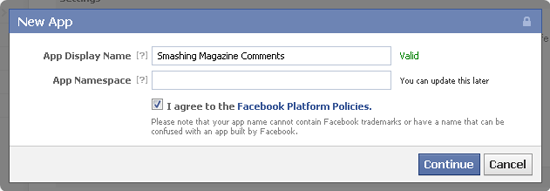
Simply click on the “+ Create New App” button on the Facebook Application page, and enter a unique name for your application in the “App Display Name” field. The “App Namespace” field doesn’t have to be filled in for Facebook comments (it’s used with the Facebook Open Graph Protocol).
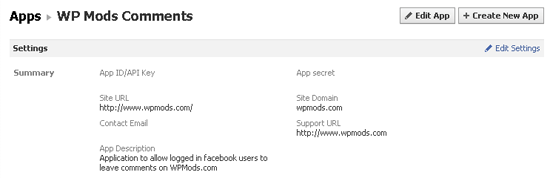
You will then be provided with an “App ID/API key” and an “App secret key.” You don’t need to remember these numbers because the official Facebook comments plugin automatically inserts them into the code that you need to add to your website.
2. Add the Code to Your Website
Next, go back to the Facebook Comments plugin page and get the code for your website. The box allows you to change the URL on which comments will be placed, the number of comments to be shown, the width of the box and the color scheme (light or dark).
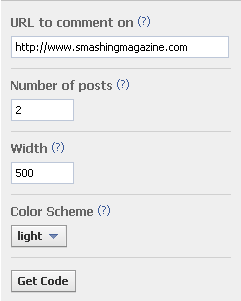
You don’t have to worry about what you enter in the box because all of the attributes can be modified manually. And it doesn’t matter what URL you enter because we will be replacing it later with the WordPress permalink:
href
The URL for this Comments plugin. News feed stories on Facebook will link to this URL.width
The width of the plugin in pixels. The minimum recommended width is 400 pixels.colorscheme
The color scheme for the plugin (either light or dark).num_posts
The number of comments to show by default. The default is 10, and the minimum is 1.mobile(beta)
Whether to show the mobile version. The default isfalse.
When you click on the “Get Code” button, a box will appear with your plugin code (choose the HTML5 option, because FBML is being deprecated). Make sure to select the application that you set up earlier for your comments so that the correct application ID is added to the code.
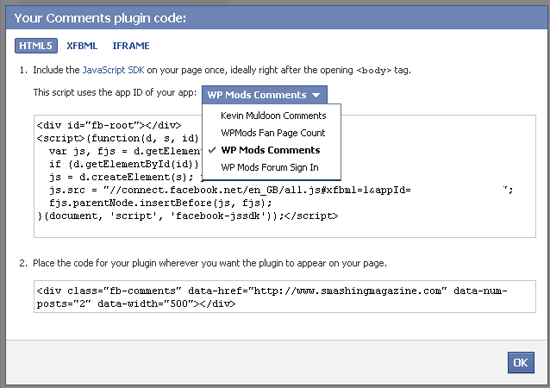
Insert the first piece of code directly after the <body> tag in your header.php template:
<div id="fb-root"></div>
<script>(function(d, s, id) {
var js, fjs = d.getElementsByTagName(s)[0];
if (d.getElementById(id)) return;
js = d.createElement(s); js.id = id;
js.src = "//connect.facebook.net/en_GB/all.js#xfbml=1&appId=YOURAPPLICATIONID";
fjs.parentNode.insertBefore(js, fjs);
}(document, 'script', 'facebook-jssdk'));</script>
Put the second line of code where you want to show the comments. Make sure the static URL is replaced with the WordPress permalink (<?php the_permalink(); ?>) so that comments show correctly on every page of your website.
<div class="fb-comments" data-href="<?php the_permalink(); ?>" data-num-posts="15" data-width="500"></div>
To put Facebook comments above WordPress comments, add the above code just below the line that reads <!-- You can start editing here. --> in the comments.php template. To put Facebook comments below WordPress comments, add the above code below the </form> tag (again in the comments.php template).
If you plan to completely replace your WordPress comments with Facebook comments, simply replace the call to your comments.php template with the call to your Facebook comments. For example, to replace comments in posts, simply add the code to the single.php template. Similarly, edit the page.php template to show Facebook comments on pages.
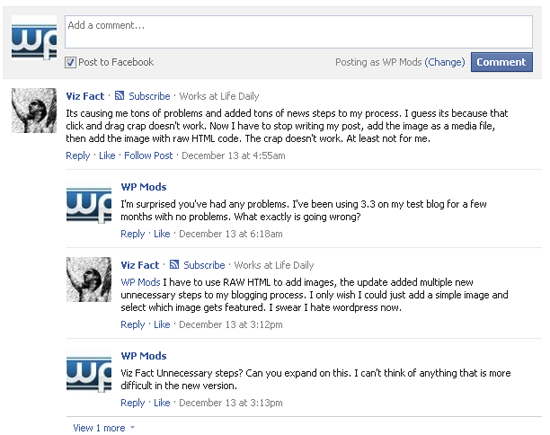
Your should now see the Facebook comments box displayed on your website. To get an update whenever someone leaves a comment using Facebook, add yourself as a moderator to your application on the Comment Moderation tool page.
Show Your Latest Tweets In The Sidebar
Displaying your latest tweets is a good way to encourage people to follow you on Twitter. The most common place to display tweets is in the sidebar, although you can add them to any area of the website.
Display Your Latest Tweets Manually
I have tried a few manual solutions for showing tweets on my websites, and my favorite comes from Chris Coyier of CSS-Tricks. His RSS fetching snippet is a quick and effective way to show the latest tweets from your account. The RSS address of your Twitter account is http://api.twitter.com/1/statuses/user_timeline.rss?screen_name=xxxxx (where xxxxx is your Twitter user name). For the tweets that you favorite, use http://twitter.com/favorites/xxxxx.rss. For example, the RSS for the latest tweets from Smashing Magazine is http://api.twitter.com/1/statuses/user_timeline.rss?screen_name=smashingmag; and to display only the favorites, https://twitter.com/favorites/smashingmag.rss. Once you’ve got your Twitter RSS address, simply add it to Chris’ PHP snippet.
<?php
include_once(ABSPATH . WPINC . '/feed.php');
$rss = fetch_feed('https://api.twitter.com/1/statuses/user_timeline.rss?screen_name=smashingmag');
$maxitems = $rss->get_item_quantity(3);
$rss_items = $rss->get_items(0, $maxitems);
?>
<ul>
<?php if ($maxitems == 0) echo '<li>No items.</li>';
else
// Loop through each feed item and display each item as a hyperlink.
foreach ( $rss_items as $item ) : ?>
<li>
<a href='<?php echo $item->get_permalink(); ?>'>
<?php echo $item->get_title(); ?>
</a>
</li>
<?php endforeach; ?>
</ul>
For a more stylish way to display tweets manually, check out Martin Angelov’s tutorial “Display Your Favorite Tweets Using PHP and jQuery,” or Sea of Cloud’s “Javascript Plugin Solution.”
Display Your Latest Tweets Using the Official Twitter Widget
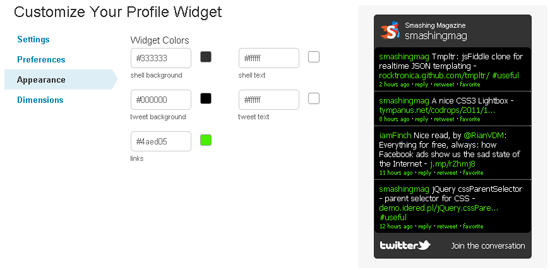
The official Twitter profile widget looks great and is easy to customize. You can define the number of tweets to display and whether the box should expand to show all tweets or provide a scroll bar.
The dimensions can be adjusted manually, or you can use an auto-width option. The color scheme can easily be changed in the settings area, too. Once the widget is the way you want it, simply grab the code and add it to the appropriate WordPress template.
Display Your Latest Tweets Using a WordPress Plugin
If you don’t want to code things manually or use the official Twitter profile widget, you could try one of the many plugins available:
- Cardoza Twitter Box
- Floating Tweets
- Latest Twitter Sidebar Widget
- My Twitter Ticker
- Tweet Blender
- Twitter Plugin for WordPress
- Twitter Widget Pro
Add Social-Media Sharing Buttons To Your WordPress Website
Adding social-media sharing and voting buttons is very straightforward and enables readers to share your content on the Web. Simply get the code directly from the following pages:
The buttons you get from the above links work well when added directly to posts (single.php) and pages (page.php). But they don’t work correctly on the home page (index.php) or the archive (archive.php) by default, because we want to show the number of likes, pluses and retweets for each individual article, rather than the page that lists the article. That is, if you simply add the default code to index.php, every button will show the number of shares for your home page, not for each article.
To resolve this, simply make sure that each button uses the article permalink, rather than the URL of the page it is on. To add sharing buttons only to posts, simply choose the button you want from the links above and copy the code to single.php; to add the buttons only to pages, just add the code to page.php.
To show the number of likes, pluses and retweets that an article has on the home page and in the archives, follow the steps noted below for Facebook, Google+ and Twitter below (the code for showing a sharing button on the index page will work for posts and pages, too). You can see an example of sharing buttons integrated in post excerpts on my own website WordPress Mods and on popular blogs such as Mashable.

Facebook’s Like button comes with a lot of options. Choose from three layouts: standard, button count and box count. An email button (labelled “Send”) can be added, and you can set the width of the box, too. You can also show profile pictures below the button, choose between the labels “Like” and “Recommend,” choose between a light and dark color scheme, and set the font.
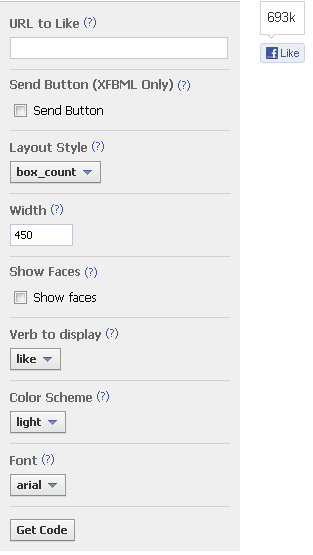
You need to add two pieces of code to your website. First, add the JavaScript SDK code directly after the <body> tag (in the header.php template). This code has to be added only once (i.e. if you’ve already added the code to show Facebook comments on your website, you don’t need to add it again).
Put the second piece of code where you want to show the Like button. To ensure that the correct page is referenced, add href="<?php echo get_permalink($post->ID); ?>" to the second piece of code. It should look something like this:
<div class="fb-like" data-href="http://www.facebook.com/smashmag" href="<?php echo get_permalink($post->ID); ?>" data-send="false" data-layout="box_count" data-width="450" data-show-faces="true" data-font="arial"></div>
More information on how to customize the Like button can be found on the Facebook Like Button page.
Google+
Google+ offers four sizes of sharing buttons: small, medium, standard and tall. The number of votes that a page has received can be shown inline, shown in a bubble or removed altogether.
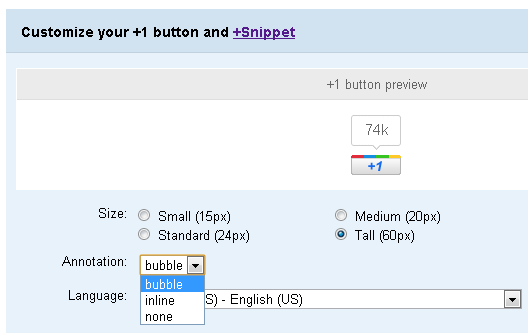
Linking to your article’s permalink is very easy. Just append href="<?php the_permalink(); ?>" to the g:plusone tag. For example, to show a tall inline Google+ button, you would use the following code:
<!-- Place this tag where you want the +1 button to render -->
<g:plusone size="tall" annotation="inline" href="<?php the_permalink(); ?>"></g:plusone>
<!-- Place this render call where appropriate -->
<script type="text/javascript">
(function() {
var po = document.createElement('script'); po.type = 'text/javascript'; po.async = true;
po.src = 'https://apis.google.com/js/plusone.js';
var s = document.getElementsByTagName('script')[0]; s.parentNode.insertBefore(po, s);
})();
</script>
For more tips on customizing the Google+ button, please view the official Google+ button documentation page.
Twitter offers four types of buttons: one for sharing links, one for inviting people to follow you, a hash tag button for tweeting stories, and another for mentions (used for contacting others via Twitter). The button you need to show the number of shares that an article has gotten is called “Share a link.”
On the button customization page, you can choose whether to show the number of retweets and can append “Via,” “Recommend” and “Hashtag” mentions to the shared link.
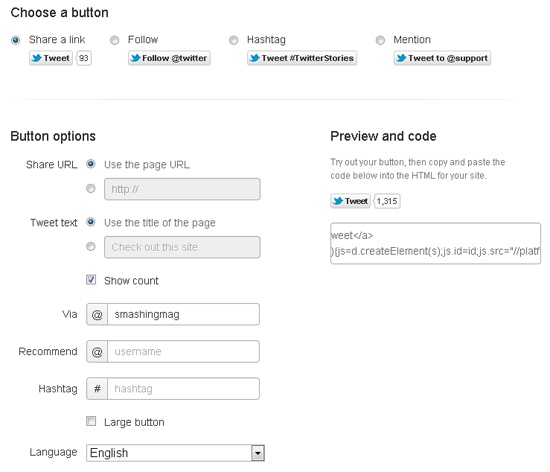
To make sure Twitter uses the title of your article and the correct URL, simply add data-text="<?php the_title(); ?>" and data-url="<?php the_permalink(); ?>" to your link. For example, if you were using the small button, you would use:
<a href="https://twitter.com/share" class="twitter-share-button" data-via="smashingmag" data-text="<?php the_title(); ?>" data-url="<?php the_permalink(); ?>">Tweet</a>
<script>!function(d,s,id){var js,fjs=d.getElementsByTagName(s)[0];
if(!d.getElementById(id)){js=d.createElement(s);js.id=id;js.src="//platform.twitter.com/widgets.js";
fjs.parentNode.insertBefore(js,fjs);}}(document,"script","twitter-wjs");</script>
To show the larger button instead, simply append data-size="large" to the link. To show the popular vertical button (shown below) instead of the default horizontal button, append data-count="vertical" to the link.
For more tips on customizing the Twitter button, please view the official Twitter button documentation page.
Summary
Many WordPress users continue to use plugins to integrate social-media sharing buttons and activity on their websites. As we’ve seen, though, integrating social-media services manually is straightforward and, for many users, a better solution than simply installing a plugin and making do with whatever features it offers.
Integrating Facebook comments on your website takes only a few minutes and is much less complicated than any of the available plugins. While good tutorials are available that show you how to manually add Twitter to your website, the official widget from Twitter is the best all-around solution for most websites.
Some fantastic plugins exist for WordPress to automatically insert social-media voting buttons in your design. Installing and setting them up takes only a few minutes, although manually adding the buttons enables you to give them maximum visibility.
Remember, play it safe and make any changes in a test area first before applying the changes to the live website. I also recommend backing up all of your template files before changing anything (and your database if required). A few minutes of preparation could save you hours of troubleshooting, so try not to skip this step.
Hopefully, you’ve found this useful. If you are unsure of any aspect of this tutorial, please let us know and we’ll do our best to clarify the step or help you with it. Also, subscribe to Smashing Magazine via RSS, Twitter, Facebook or Google+ to get the latest articles delivered directly to you.
(al)


Nick
January 19th, 2012 8:49 amAny ideas on automatically pushing posts from WordPress directly to Facebook (ie, without having to use a share button)? Some clients prefer to spend as little time as possible in Facebook so getting them to log in, then post, then share can be tough.
I use the NetworkedBlogs Facebook App, but when the Facebook user clicks on the link, it only displays the WordPress post in what appears to be an iFrame on NetworkedBlogs’ site, and you have to click the remove frame button to go to the actual post.
I know there’s also some WP plugins out there to push posts to Facebook, what do folks use?
Annie
January 19th, 2012 10:05 amI’ve been using this one: http://wordpress.org/extend/plugins/add-link-to-facebook/
It sends automatically to Facebook and integrates likes, comments, etc. There are a lot of more options to check.
@Post
Great post! I want to like Google+ but it still feels sorta of empty overall and I don’t know if enabling it on my sites is good or just adds clutter
Kevin Muldoon
January 19th, 2012 10:13 amLooks like a decent plugin. I like the idea of copying facebook comments to the WordPress database.
Kevin Muldoon
January 19th, 2012 10:11 amHi Nick,
I use RSS Graffiti on my facebook page. It works great. You simply enter your feedurner or rss feed url and it automatically publishes your latest posts directly to it. I’ve been using it for a long time and never had any problems.
Kevin
lisa
January 19th, 2012 10:39 amYeah, we ran into the same thing…would also be interested in this.
Sainik
March 29th, 2012 12:23 pmYou can use Buffer to post to facebook.
Andy
January 19th, 2012 8:56 amSome nice tips and more importantly code there – especially the simple RSS Twitter code. Thanks
Kevin Muldoon
January 19th, 2012 10:11 amGlad you liked the post Andy :)
Austin
January 20th, 2012 4:58 amThe RSS code is good, but for active sites you’ll want to add in a cache variable. Otherwise it eats up server resources.
PerS
February 8th, 2012 3:14 amFyi: “fetch_feed caches results for 12 hours by default. You can modify this by modifying the time interval via the filter wp_feed_cache_transient_lifetime” .. from http://codex.wordpress.org/Function_Reference/fetch_feed#Notes
Rich Fisher
January 19th, 2012 8:57 amAh yes… the holy grail: I post on my blog and it automatically posts to G+, Facebook, and Twitter. How do I achieve such a lofty goal?
Kevin Muldoon
January 19th, 2012 10:12 amI use RSS Graffiti for Facebook and TwitterFeed for Twitter but I haven’t come across any solutions for Google+ as yet.
Chuck
January 19th, 2012 9:35 amThanks Kevin for the goodliness!
PS Love the new site design.
Kevin Muldoon
January 19th, 2012 10:12 amThanks Chuck.
Karen Thompson
January 19th, 2012 10:16 amI agree with Nick. Would love to know the simplest way of pushing WordPress posts out to social media, rather than the other way around. If clients could post to WordPress and have their social media updated seamlessly without having to follow another step, that would be awesome!
Kevin Muldoon
January 19th, 2012 2:19 pmI can understand the need for this from a client point of view. It really only takes seconds to install RSS graffiti for facebook and you can login to twitterfeed using your google account (or many other applications) and set up twitter updates in a minute or two.
Jessica
January 19th, 2012 12:08 pmThis post popped up exactly when I needed it to – talk about luck and time-saving! Thanks!
Paulo Dias
January 19th, 2012 12:26 pmNice post Kevin, basic and userfull !!
Ed
January 19th, 2012 12:50 pmAwesome post, this is the type of quality content I like to see on Smashing. Am I the only one who thinks people DON’T like the facebook comment system and would rather use a screen name? What is this site using I like it :)
Kevin Muldoon
January 19th, 2012 2:21 pmGlad you all enjoyed the post. Make sure you stay subscribed to Smashing Magazine as I have a good post on social media plugins coming soon :)
ToSo
January 19th, 2012 2:38 pmAwesome post Kevin, you’ve made my day! :)
I found a little mistake in the twitter example you’ve posted.
There’s a missing “d” in first line: “ata-text” must be “data-text”. :)
Kevin Muldoon
January 19th, 2012 5:29 pmThanks for that. I’ve updated the post :)
Steve M
January 19th, 2012 3:07 pmVery helpful and timely article as I’ve been struggling with this for a couple months now, trying to figure out the best way to integrate Facebook into my site. Also, the recommendation in the comments section regarding RSS Graffiti will help a lot.
Kevin Muldoon
January 19th, 2012 5:32 pmI believe there are few options available Steve however I’ve not had any problems with RSS Graffiti so I recommend trying that out first and if it doesn’t do what you want to do look for something else.
Sebastien
January 19th, 2012 3:15 pmAnyone found a nice way to add your google plus posts to wordpress ? or your google plus shares ? I’m trying to bring in my google reader shares on my wordpress blog.
Lee
January 19th, 2012 4:54 pmI made a pretty simple little twitter feed class last year that I use on websites. Basic and has some simple functionality to add specifics…
Greta post by the way. I’ll be looking at uses a few of the suggested plugins above :) Thanks!
Syed Balkhi
January 19th, 2012 8:01 pmMy favorite plugins for these integration:
Simple Facebook Connect – Has all what you need. FB OG Meta Data, FB Login, FB Comments, FB Like Buttons, FB Like Box etc.
Simple Twitter Connect – Has all what Twitter Anywhere has to offer… Hovercards, Twitter Connect and much more.
For recent tweets, nothing beats the Seaofclouds jQuery script.
For Google+ – still in beta SImple Google Connect.
All plugins are by same author Otto (very smart guy)…
Don’t try to manually do everything when a powerhouse plugins like above can take care of it all for you.
Pigi
January 19th, 2012 11:12 pmHey, great article, maybe you forgot “;” after the permalink() in the facebook comment section.
Thanks
Kevin Muldoon
January 20th, 2012 7:48 amThanks Pigi. Corrected :)
Henry Hoffman
January 20th, 2012 1:12 amThanks for the post – I’ll bookmark this as reference, as there seems to be so many solutions it’s often hard which to choose.
I also use the Most Shared Posts plugin, which automatically counts post shares, then adds them as meta data, allowing me to alter the loop to sort by that meta value. Really useful for sorting posts by shares.
adumpaul
January 20th, 2012 2:58 amGreat article.Really niec work.Keep good working.Thank you for sharing.
Notpoppy
January 20th, 2012 3:00 amThanks for this article which is up to Smashing’s usual high standards.
But having read the headline I was hoping this would be the article that finally tells me how to unify logins between Facebook/Twitter/Google+ and WordPress.
I have thousands of registered users on my WordPress site and would like them to be able to connect their Facebook/Twitter/Google+ accounts with them.
This would allow them to be automatically logged in to their accounts on my site when they visit, and have the option of cross-posting their comments to whichever social platforms they choose.
I’m sure if Smashing were to tackle the subject of this kind of deep integration you’d have a very successful and popular article on your hands. And one very grateful reader!
Kevin Muldoon
January 20th, 2012 7:50 amHi Notpoppy,
I’ll send an email to Smashing Magazine about this. I’d be happy to tackle this subject and look into the plugin solutions available for WordPress that let users connect using social media websites.
Kevin
Kevin Muldoon
January 20th, 2012 10:34 amQuick update. Smashing Magazine want me to proceed with this article. Thanks for the suggestion. I’ll be working on the article over the weekend so hopefully it will be published over the next week or so :)
Notpoppy
January 22nd, 2012 12:42 pmNow that’s what I call listening to your users! Look forward to seeing it, thanks Kevin. If I can be of any assistance do drop me an email.
Pablo
January 20th, 2012 5:14 amGreat article! Thanks
haha
January 20th, 2012 12:25 pm:)
sealyspeak
January 20th, 2012 5:17 amMany many thanks! I have just started to mess around with themes so all this info was a real treat!
Sebastian
January 20th, 2012 5:38 amI’m the author of a WordPress plugin to automatically import any public G+ post into your blog.
It is called Google+ Crossposting, see http://wordpress.org/extend/plugins/g-crossposting/
Emre Camasuvi
January 20th, 2012 7:37 amIs there a plugin like cognition.happycog.com’s blog?
You can only comment with tweet or blog post as a response. Tweet as commenting, idea is so neat. I hate facebook.
Kevin Muldoon
January 20th, 2012 7:54 amWow. I’ve never came across that before. Personally, I don’t like forcing users to only use Twitter to respond to an article as many people don’t use it. It’s a great concept though.
I’ve never seen this used on another site so my first impression would be that it is a custom solution.
Evan Jacobs
January 20th, 2012 9:03 amI’d like to vouch for sharrre.js for social sharing buttons. The library is quite lightweight and even allows you to easily restyle the generated buttons, all with a single API call for each service ( regardless of how many times you use the buttons.)
ansel
January 20th, 2012 9:10 amIsn’t Sharedaddy (a WordPress-made plugin bundled with Jetpack) the best way to add social buttons, instead of doing it manually?
Kevin Muldoon
January 20th, 2012 10:20 amYou can’t change the size of the buttons and you can’t change the layout etc either. It’s a good plugin and is a great solution for many people but it isn’t for everyone.
Seth Neal
January 20th, 2012 9:53 amI can’t get this Facebook comment thing to work for the life of me. I created my FB app and edited single.php and header.php… but nothing.
Any common mistakes people make with this?
Kevin Muldoon
January 20th, 2012 10:24 amHi Seth,
I was helping someone with this a few days ago in the WP Mods Forums. I checked all his code. The code in his header.php and comments.php template were perfect, as was the application he set up. I tried everything and couldn’t get it working. In the end he found that that there was a javascript line of code for Facebook in the theme. Have you checked your theme for something like that – i.e. something that is conflicting with it.
Seth Neal
January 21st, 2012 7:47 pmKevin!!
That’s exactly what it seems to be! I appreciate the time man! Thanks!
Seth Neal
January 23rd, 2012 8:49 amOK, after a bit of trouble shooting, found out that the FB “Share” button (any of them actually) in Jetpack’s sharedaddy plugin was the cause. I just removed the FB button (kept the Google+, Twitter button) and it works perfectly!
redwall_hp
January 20th, 2012 2:22 pmJust a heads-up: Some people, such as myself, refuse to comment on sites that use Facebook-powered comments. Not everyone share’s Zuckerberg’s dream of stripping anonymity from the internet.
Roland
January 20th, 2012 7:27 pmWhat about the recent news that posts shared via third party apps on Facebook no longer have the “share” option? Wouldn’t that make using those external tools to publish WP posts or Twitter updates etc much less attractive? Some apps apparently have their workaround share button, but the likes may not be counted in Insights. Thoughts?
Kevin Muldoon
January 21st, 2012 5:56 amI never knew that Roland. It’s something that you would have to take into consideration when adding the button to your site if it is the case. I don’t see why Facebook would remove this option though – surely they want more people sharing articles on Facebook.
Kelvin Servigon
January 20th, 2012 11:03 pmAwesome post. I used your guide to integrate Facebook comments on my blog and currently thinking of putting the Twitter feed on my sidebar.
Thanks for sharing!
prowebguru
January 21st, 2012 5:24 amSharing option is very much needed for readers , but by adding these facebook, twitter and google share buttons, will there be any extra overhead on loading of pages ?
Kevin Muldoon
January 21st, 2012 5:49 amYes it does add a little load – adding anything to a web page does. More concerning is that the code that is added doesn’t validate with W3 etc but it’s very difficult to add any 3rd party code and still validate your site correctly.
Stewart
January 21st, 2012 5:40 amGreat article, have a quick question for you guys.
Anybody know of a plugin that allows you to decide wether to display share buttons based on a post by post basis.
Currently working with a client who only wants share buttons showing up for certain post categories. It be cool if there was a way of switching them off in the same way you can switch comments off. Any suggestions?
Kevin Muldoon
January 21st, 2012 5:53 amI believe there are a few basic social media plugins that let you add share buttons using short codes. This would allow your client to post the share buttons at the bottom of the content area directly.
Stewart
January 22nd, 2012 11:21 amOh thanks. i found Social Sharing Toolkit and that works perfectly.
Nexstair
January 21st, 2012 6:30 amThanks for sharing absolutely useful info. Can you please provide me some more guideline about web design/development?
Özgür
January 21st, 2012 9:53 amHi, there. Nice post Kevin. I got worked the system but I want to be notified when a user leave a comment on any post. I added myself as an admin/moderator but no chance. Would you explain how?
Tamara
January 21st, 2012 9:59 amVery helpful, thanks so much!
Also, thanks for adding the categories in the sidebar :)
nofb
January 21st, 2012 4:27 pm… enabling Facebook comments on your website is a great way to give the middle finger for everyone out here who dislikes it and refuses to step on their platform.
BBL
January 22nd, 2012 12:04 amNice post , thanks so much
Arno Hoogwerf
January 22nd, 2012 3:34 amI use the the Mailchimp Social Plugin for WordPress to include all the Twitter and Facebook replies into my WordPress blog. All the comments are placed in one overview, and you can keep in control of the layout of the comments. I like the Facebook functionality but hate the blue layout which dominates my design.
Kevin Muldoon
January 27th, 2012 8:38 amI tried that out last week in preparation for my next article on Smashing Magazine. It looks great.
Robert Roose
January 23rd, 2012 6:27 amThanks! I have been struggling to integrate Facebook comments on my blog, this really helped.
Earl
January 23rd, 2012 10:07 amHi. Thanks for the tips.
I tried the tutorial for “Integrate Facebook Comments On Your Website”. It works, but when someone uses it to comment on one of my pages, the Facebook comment appears on every post. Is there a way so any user can comment separately for each post?
Ethan Hackett
January 23rd, 2012 11:22 amI followed the steps to add the Facebook comments but when I run the page and debug javascript I see an unsafe error.
“Unsafe JavaScript attempt to access frame with URL… …from frame with URL
I tried to do a google search but didn’t seem to find any solutions that would remove the error.
Ethan Hackett
January 23rd, 2012 11:28 amFor the Facebook comments plugin you could also do some custom css to give it a fluid width I used the following so it would flow with my adaptive design.
.fb_iframe_widget {
width: 99%;
}
.fb_ltr {
width: 100% !important;
}
Jaabecca Jones
January 24th, 2012 7:06 amGreat info. Very detailed! I appreciate the much needed input. Thanks!
Richard
January 25th, 2012 6:49 amThis is a good post, but I’m even more impressed with the author’s willingness to read through the comments, offer truly helpful advice, and even decide to write his next article based on a user’s comment. Keep up the great work.
Kevin Muldoon
January 27th, 2012 8:40 amThanks Richard. I appreciate the kudos. I wanted to have the next article online by now but a combination of my laptop breaking, getting a new one and installing software etc and fixing things in our new apartment has put me behind schedule. Should have the article online within the next week or so :)
Francisco Carle
January 25th, 2012 12:22 pmThanks a lot Kevin for this useful article.
I’ve implemented all the ideas you describe in your post. It works but…..it doesn’t look good enough according to my design standards.
Is there a way to align (horozontally, of course :P) the three social bubbles?
Facebook and twitter are ok, but G+ seems to be a little low (if you enter my blog you’ll notice it inmediately.
Please help me folks. ;)
By the way Kevin, where are you working now? I’m from Chile, best regards!
Kevin Muldoon
January 27th, 2012 8:43 amI’m actually having the same problem getting all three aligned properly horizontally. I believe it’s the Facebook like button that causes this as you need to link to the Facebook class fb-like in order for the button to display correctly. I kind of gave up after trying to resolve it as I didn’t want to waste a lot of my time on it, though I’m sure there’s a simple solution out there.
I’m based in Colombia just now. Hoping to travel to Ecuador, Peru and Bolivia over the next few months. Then heading back to Scotland for a month or so but hope to be back here afterwards and then go to Chile, Argentina, Uruguay, Paraguay and Brasil at the end of the year.
dcolumbus
January 26th, 2012 12:57 amI love how someone finally wrote an article that doesn’t blast the terrible design philosophy of “oh, just install this plugin…” Man, there are so many trashy, terribly developed plugins (and themes) out there it makes me sick.
Fantastic article.
Kevin Muldoon
January 27th, 2012 8:45 amThanks. I appreciate the kind words. :)
Lauren
January 27th, 2012 5:53 pmThis was really helpful. Thank you!
Rahul
January 28th, 2012 3:04 amHi
I like your article but i want to ask one thing which i have been searching on the web for weeks now. I like to use Responsive Design like most people i know and i prefer to use Disqus or Facebook comment insted of default wordpress comment system. Is there a way to make either of the two responsive ??
Regards
Kevin Muldoon
January 28th, 2012 12:30 pmDisqus and Livefyre etc work well on mobile phones and tablets etc (is that what you mean?).
Jonas
January 28th, 2012 4:10 amI find that using the APIs for social media buttons is a much better option than using the buttons they provide, as they tend to be quite slow to load. Thanks for the tutorial on Facebook comments though!
Kevin Muldoon
January 28th, 2012 12:19 pmLauren / Jonas – Glad you enjoyed the article :)
Oscar Capdevila
February 2nd, 2012 12:43 amI’ve lost a precious time with FB like button before reading your post. Now it’s working propertly. Many thanks and Congratulations for your posts Kevin.
Benny Jien
February 7th, 2012 6:18 amThank you, Kevin!
This post really help me. I prefer these methods than using plugins.
I think these are cleaner.
Alain
February 7th, 2012 11:45 amGood morning. I followed your procedure and it works perfectly Facebook in each posts. However I see a little problem. On Google SEO tools I noticed a red indicating a synchronous script facebook too greedy. What do you think? Thank you for your response.
Andy Romero
February 9th, 2012 8:57 amgratest tutorial! how we can make a wirget to show the latest facebook comments??? thax a lot!
Luca
February 11th, 2012 3:25 amHi Kevin, I am a newbie and I wonder if it is possible to use these solutions in a multilingual multisite environment. Thanks for the great post.
Kevin Muldoon
April 19th, 2012 4:10 pmI don’t have much practical experience with Multisite. Sorry :)
disk
February 12th, 2012 7:47 pmI cannot argue with the excellent content your blog has to supply and for that reason I desire to say thanks
Vladimir Prelovac
February 15th, 2012 7:13 amGreat post Kevin! What plugins help you add twitter and like buttons to your RSS feed?
Kevin Muldoon
April 19th, 2012 4:15 pmThanks Vladimir :)
Feedburner natively adds Facebook, Digg and a few other sharing links (not Google+ though). If you login to your Feedburner account you’ll find an option under publicize/socialize that allows you to connect your twitter account too.
Daniel Veazey
February 16th, 2012 7:09 pmSomething I have to remind myself of: When things don’t go as expected, go back and re-read the instructions to find the step I missed. Thanks for this post.
Sean
February 17th, 2012 4:42 pmBit disappointed that there was no optimization techniques for the sharing buttons.. Especiallt twitter/ widgets.js.. it kills loading time on large traffic sites
SeanD
February 26th, 2012 3:05 pmWonderful article, it is very helpful to have this type of tutorial focused, concise and to the point.
I noticed that Jonas commented above about using the API to utilize your own custom buttons, instead of the default ones provided. Does anyone know of a good place to learn about using the API for this? I have a situation where for a client’s site, I am working with a designer who would most likely love to use their own custom graphics for the FB and Twitter share functions. I know from Google searches that the share functionality has been deprecated by FB – it seemed one used to be able to simply place some code in the a href tag, and use the sharer.php functionality. Now, it is more complicated and I can’t seem to find a quality tutorial on how to proceed down this more customized path. (Hint: maybe another good follow up tutorial for Smashing Magazine :) ).
Thanks again for this article, it will promptly be placed in my bookmark list.
Harsha
March 2nd, 2012 3:14 amHi Kevin,
Thank you for posting this wonderful tutorial and i have some doubts can you please show me how to add the COVER PHOTO in newly created page and in newly launched FB page version? I saw in help but I Could not find that option here is the reference link -How-do-I-add-a-cover-photo-to-my-Facebook-Page? ” If you know the answer please mail me or post it here itself. it will be a great help for me.
Thank You
Ryan
April 12th, 2012 4:23 amI put the facebook comment system in place on our new site last night and I’m having one issue. When a person comments on the post, it gives the main URL to the website via Facebook, not the URL of the post. It seems inconvenient to think that people will have to try to locate the post a friend commented on after clicking a link on Facebook. Is there a remedy for this? The blog is http://www.collisioncm.com/blog. Any advice on this issue would be amazing!
Ryan
April 12th, 2012 4:44 amNevermind, I found the issue and fixed it.
hailton
April 18th, 2012 4:52 pmHi Kevin Muldoon.
This was a great tutorial. Really helpfull.
Now I have the social buttons well integrated in my site. With no problems, working in categories, single post and whatever. Thank you for this
Kevin Muldoon
April 19th, 2012 4:18 pm@Ryan There’s an option just under the large cover photo that lets you change it. You should see it just above your comment area on your page.
Nandita B
April 29th, 2012 10:29 amThanks Kevin,
The way you have written the article with supporting images, I really appreciate. I am going to try adding Google+ and Twitter widget on my sidebar as per your article.
Thanks.
Sriganesh
April 30th, 2012 2:25 pmHi, I need a help in my website. I want to show my facebook username in my website weather its logged in or not. Is it possible. Please give suggestions. I need the same to other social media twitter and google plus. Thanks is advance
Roshan
May 5th, 2012 6:12 amWhile using the facebook comment mechanism, the major drawback is that you are not the owner of those comments. The comments are being hosted in Facebook.
I have enabled facebook comments on my website http://theopennews.in . Is it possible to get those comments to my website, if i chose to stop using the facebook comment mechanism ?
Sharon Thomas
June 25th, 2012 3:54 amThanks for the article. The supporting images are easy to understand and I love the way you have organized them.I am going to integrate Facebook comments on my website.
henk
June 29th, 2012 12:52 amGreat post, Kevin. Thanks for the foolproof instructions!
Nir Hermelin
July 14th, 2012 8:41 amFacebook recently released their own WordPress plugin… works like a charm!
Gil
September 26th, 2012 3:07 amI assume this post is pretty old but did anyone noticed that the twitter official widgets create a code that is not working?
https://twitter.com/about/resources/widgets/widget_profile
I went to create a simple widget for my website, copied the code provided, put it in my HTML website and it is not showing the twitter stream!
This is the code provided by twitter by the way:
Tweets by @any-account
!function(d,s,id){var js,fjs=d.getElementsByTagName(s)[0];if(!d.getElementById(id)){js=d.createElement(s);js.id=id;js.src=”//platform.twitter.com/widgets.js”;fjs.parentNode.insertBefore(js,fjs);}}(document,”script”,”twitter-wjs”);
Does anyone have the same issue? can anyone help?
Thanks, Gil
Peter Potylicki
December 16th, 2012 1:16 pmI have enabled the twitter side with my latest posts with a widget, is there a plugin for the facebook comments? I just need home buyers to post comments on homes they have seen for sale. Editing the code directly after the tag in the editor I am worried that something would mess up.